Skip to content
App Store Optimization for iOS and Android

The desktop ASO tool for App Store and Google Play search

Rank higher in App Store and Google Play search. asorocket tracks your keyword rankings, finds keywords worth targeting, checks your listing before you ship it, and publishes it to App Store Connect or Google Play Console. A desktop ASO tool for macOS, Windows and Linux, so your data stays yours.

macOS · Windows · Linux · No account needed

asorocket dashboard with followed apps, tracked keywords, App Store performance, what changed, search visibility and the biggest keyword moves
App Store storefronts
175App Store storefronts
stores: App Store and Google Play
2stores: App Store and Google Play
keywords per bulk run
1,000keywords per bulk run
your data stays on your computer
Localyour data stays on your computer
How it works

Research, write, ship, then see what moved

Everything you need for App Store and Google Play search in one window, from the first keyword idea to the ranking it earned.

  1. 01 · Research

    Start with keywords you can actually win

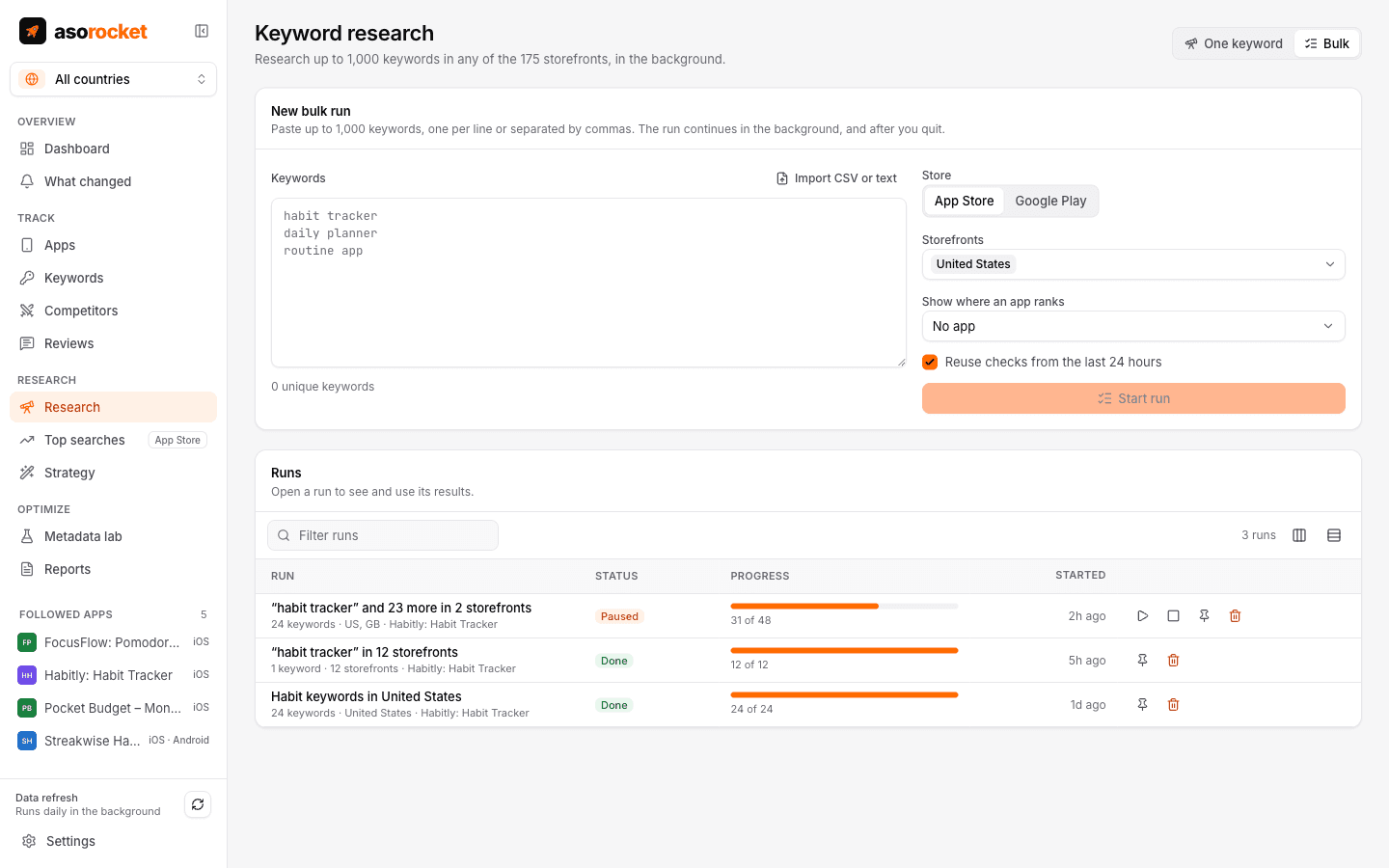
    Score a term for popularity and difficulty, see today’s top 10 in either store, and run up to 1,000 keywords across storefronts in the background to find where your app already ranks.

    • Popularity, difficulty and today’s top 10 for any term, in either store
    • Bulk runs of up to 1,000 keywords across storefronts
    • Apple’s own weekly top searches, with Apple Ads
    More about keyword research
    Bulk research with a list of keywords, storefronts and progress of a research run
  2. 02 · Write

    Write a listing that scores before it ships

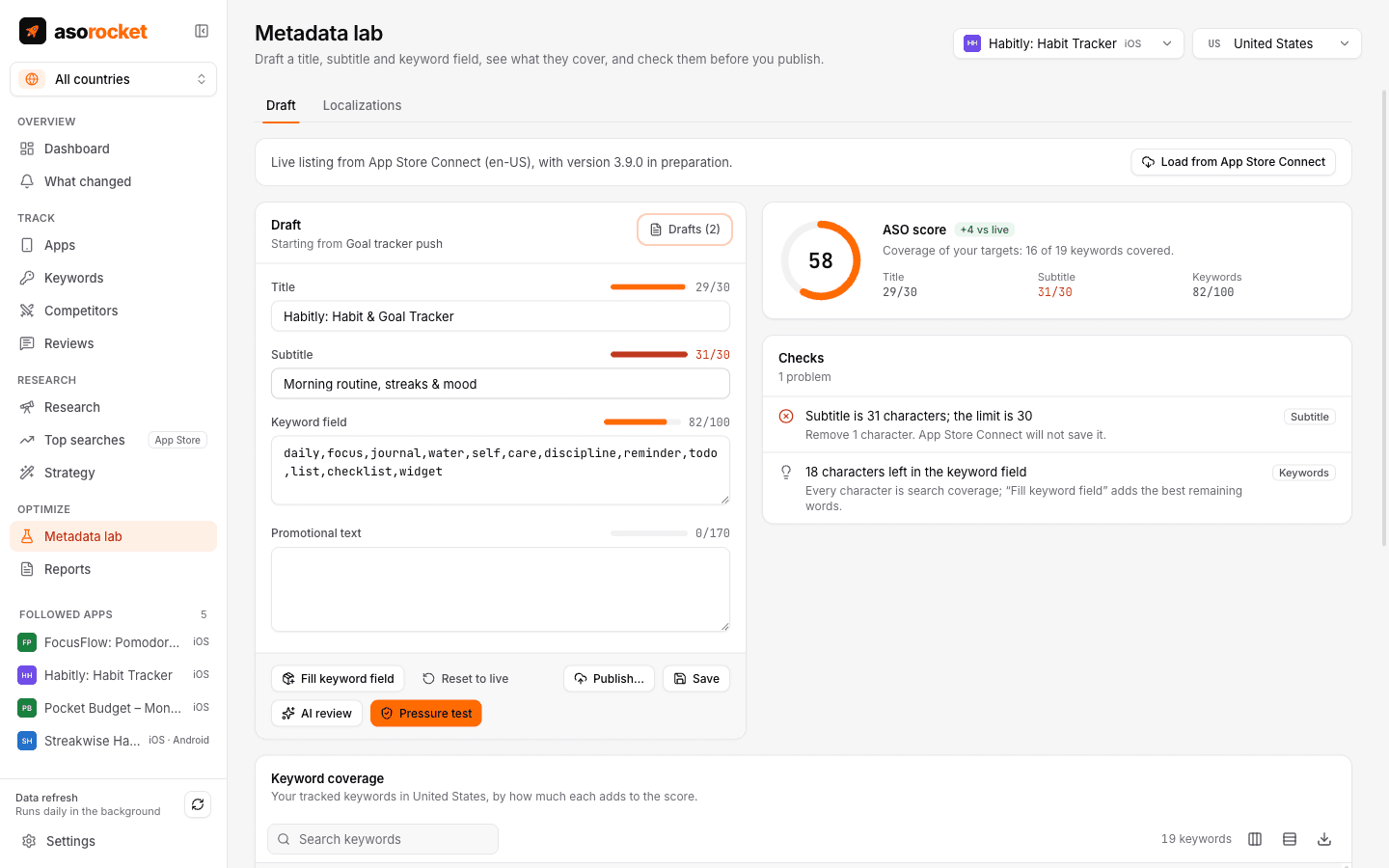
    Draft the title, subtitle and keyword field in the Metadata lab and watch coverage update as you type. The pressure test flags what App Review rejects and the keywords a draft would stop covering.

    • A coverage score that updates as you type
    • Fill keyword field packs the best words into 100 characters
    • Pressure test catches rejections and lost rankings
    • Google Play drafts too: title, short description and description
    More about the Metadata lab
    Metadata lab with title, subtitle and keyword field inputs, character counters, an ASO score and checks
  3. 03 · Ship

    Ship the draft straight into App Store Connect

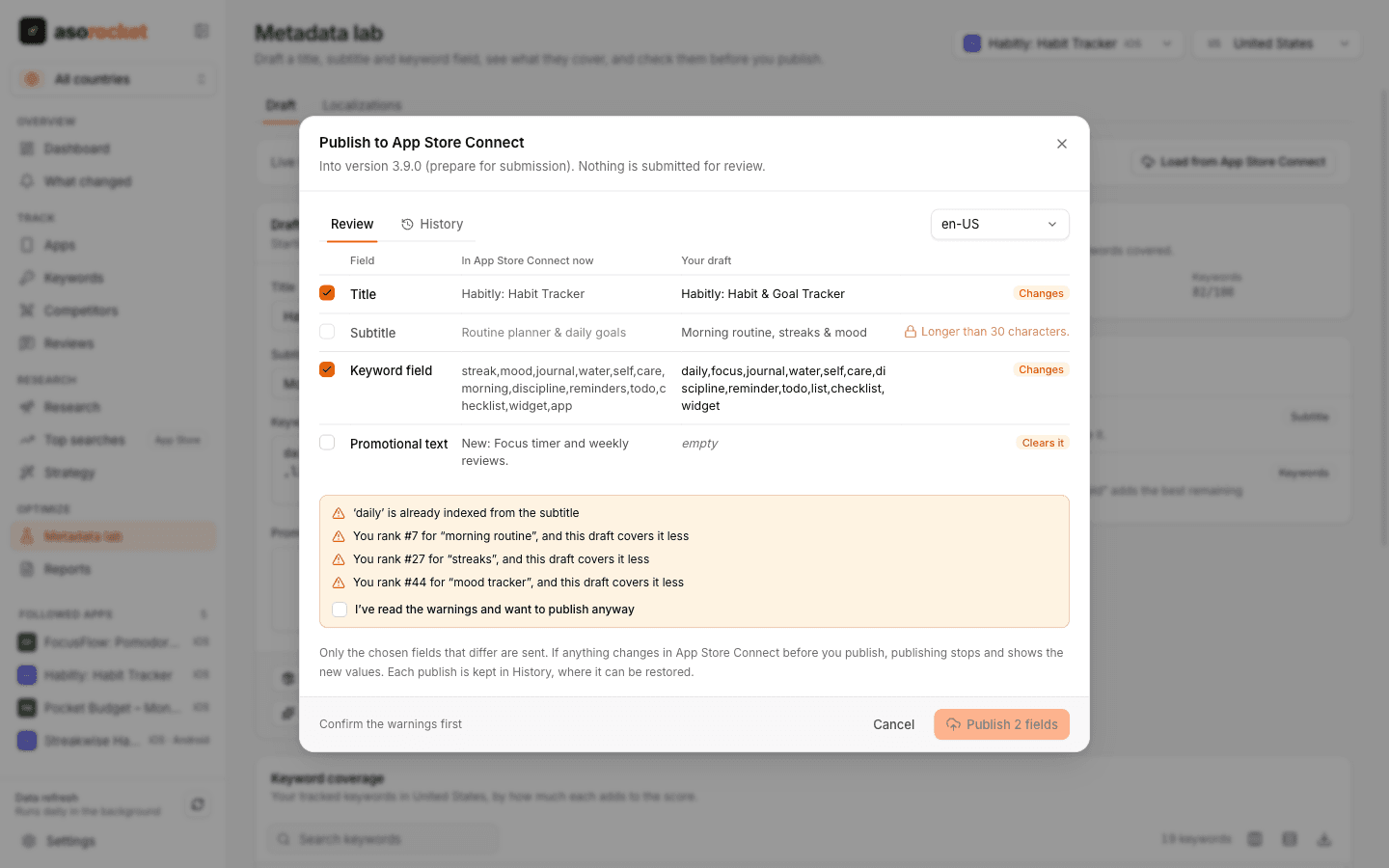
    Publish a passing draft into the version you are preparing. The review screen shows each field as it is live today next to your draft, and only the changed fields you tick are sent.

    • App Store Connect now, next to your draft, field by field
    • Only the fields you tick that changed are sent
    • Every publish kept, and one click to restore
    More about publishing to App Store Connect
    Publish review with each field in App Store Connect next to the draft, a status per field and the pressure test’s warnings
  4. 04 · Track

    Daily rank tracking in every storefront

    Each tracked keyword is checked once a day, top 200 on the App Store and top 30 on Google Play, with your competitors on the same keywords and 1, 7 and 30-day changes.

    • Daily positions per keyword and country: top 200 on the App Store, top 30 on Google Play
    • 1, 7 and 30-day changes, best rank and a 30-day trend
    • Competitors’ positions on the same keywords
    More about rank tracking
    Keyword table with daily rank, 1, 7 and 30-day changes, best rank, 30-day sparkline, popularity and difficulty
  5. 05 · See what moved

    Then see what moved, and why

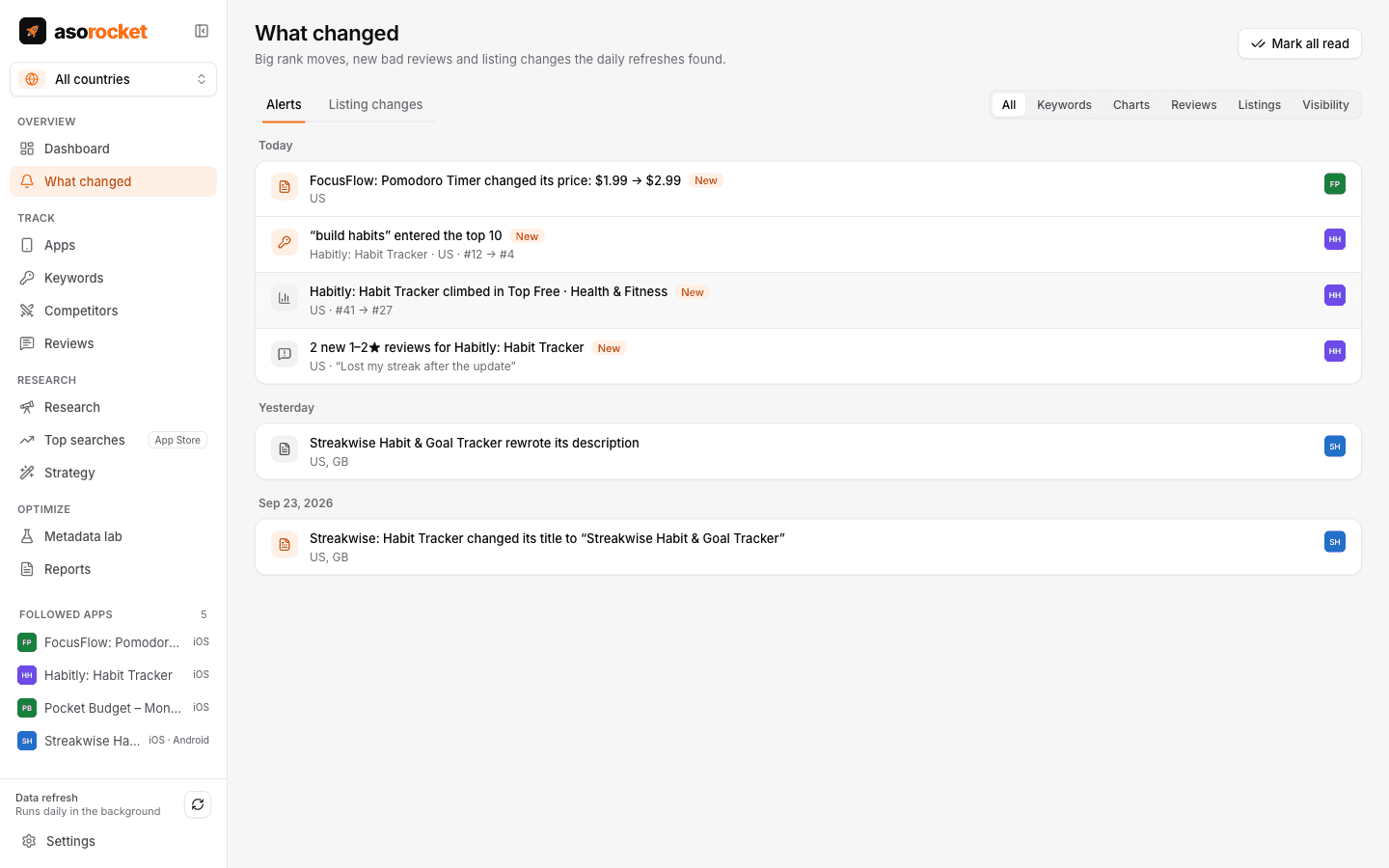
    After each refresh asorocket compares today with the last check: keywords entering or leaving the top 10, chart moves, new 1–2★ reviews and competitor listing changes, with every release marked on the chart.

    • Daily alerts for rank moves, bad reviews and competitors’ changes
    • A search visibility score for you and your competitors
    • The week before and after every release, side by side
    More about what changed and its impact
    What changed: a competitor’s price change, a keyword entering the top 10, a chart climb and new low-star reviews
Every storefront

See where your app wins, storefront by storefront

asorocket tracks your rankings in all 175 App Store storefronts and, with App Store Connect connected, shows downloads and conversion for each country next to them.

United States

Example app · sample figures

Downloads
43,570Up17%
Conversion
4.6%Up0.4 pts
Avg. rank
#12Up3 places

Daily downloads, last 30 days

Sample downloads in United States, by week
WeekDownloads
Last 7 days10,857
8 to 14 days ago10,314
15 to 21 days ago9,877
22 to 28 days ago9,634
Alerts and reports

What changed, in each client’s channel

After every refresh, asorocket sends what it found to Slack, Microsoft Teams, Discord or your own webhook, filtered per app, so each client hears about their own apps. With Studio, each app also gets a weekly or monthly report.

Slack · hooks.slack.com

Last sent 2 minutes ago.

  • Habit Loop
  • All kinds

asorocket07:02

5 changes today

Habit Loop · App Store

  • • “habit tracker” entered the top 10Habit Loop · US · #12 → #8
  • • Habit Board changed its title to “Habit Board: Daily Goals”US, GB
  • • “daily planner” climbedHabit Loop · GB · #41 → #29
  • • 2 new 1–2★ reviews for Habit LoopUS, DE · “Widget stopped syncing”
  • • Habit Loop’s search visibility rose to 38.4US · 31.2 a week ago

Sent by asorocket

  • Sent after each refresh
  • Failed sends retried for 2 days
  • Up to 40 alerts a message, the rest counted

Client report

Weekly · PDF · Studio

Weekly report

28 Sep – 4 Oct 2026

Habit Loop

App Store · US

Visibility
38.4Up7.2
Keywords in top 10
2
Chart
#22Up16

Search visibility, next to competitors

Habit Loop38.4Habit Board34.0Tiny Steps27.5

Keyword moves

Keyword ranks at the start and end of the week
KeywordRankChange
habit tracker#12 → #8Up4
routine app#9 → #7Up2
daily planner#41 → #29Up12
goal tracker#15 → #18Down3

What changed

  • 2 OctYou released version 3.1Visibility 33.0 → 38.4 since
  • 1 OctHabit Board changed its title

Example apps · sample alerts, in the wording asorocket sends

And more

The rest of your ASO toolkit

Alerts in Slack and reports for your clients, Google Play apps next to your App Store apps, competitors, review replies, Apple Ads next to organic search, your own downloads, revenue, installs by source and retention, plans built from a single keyword, and your data inside the assistant you already use.

App Store page editor

Screenshots, previews, texts and versions for App Store Connect, with a live preview and one Save.

Learn more

In-app events

Event cards for the App Store, scheduled, localized and submitted for review.

Learn more

Custom product pages and tests

Extra product pages for ads and audiences, and tests of your screenshots.

Learn more

Localization planner

Find the empty keyword fields in the extra languages each storefront indexes, and fill them.

Learn more

Google Play apps

Daily keyword ranks, charts, ratings, installs and reviews for Google Play apps, in the same tables.

Learn more

Publish to Google Play

Publish a draft’s texts to your Google Play listing and reply to recent reviews.

Learn more

One app, both stores

Link an app’s two versions to switch between them and compare them side by side.

Learn more

Apple’s top search terms

Apple’s own weekly top searches per storefront and genre, with official popularity and movers.

Learn more

Apple Ads next to organic

Spend, taps and installs per keyword next to your organic rank, both ways round.

Learn more

Competitor tracking

Side-by-side keyword ranks, charts, ratings and reviews for the apps you compete with.

Learn more

Review replies

Reply to App Store reviews with AI drafts, and see complaints grouped by topic.

Learn more

App Store Connect analytics

Impressions, page views, downloads and conversion for your apps, from Apple’s own reports.

Learn more

Revenue from RevenueCat

Revenue, MRR, subscriptions and trials per app from RevenueCat, next to rankings and releases.

Learn more

Seed keyword strategy

A seed keyword in, a scored keyword list and ready-to-test metadata out.

Learn more

ASO MCP server

29 ASO tools and 5 workflow prompts for Claude, Cursor, VS Code and Windsurf.

Learn more

Alerts in Slack, Teams and Discord

What changed, sent to Slack, Microsoft Teams, Discord or a webhook, filtered per app.

Learn more

Client reports

Scheduled PDF reports per client, under your own brand: rankings, visibility, changes and their impact.

Learn more

Google Play Console statistics

Installs, store listing visitors and conversion for your Android apps, from Play Console’s reports.

Learn more

Sync between computers

A Studio licence’s three computers share what you set up through your iCloud Drive or Dropbox folder.

Learn more

Revenue from Adapty, Superwall and Stripe

Revenue, subscriptions and trials per app from Adapty, Superwall or Stripe, next to rankings.

Learn more

Installs by source

Organic and paid installs from AppsFlyer or Adjust, by day and network.

Learn more

Retention from Firebase and GA4

Retention after install from Firebase or GA4, next to rankings and releases.

Learn more
Integrations

Your stores and your AI, wired into one app

Rankings, reviews and listings come in from the App Store and Google Play. The AI model you choose works on them with your own key, or locally, and nothing passes through a server of ours.

Installs by source
AppsFlyer and Adjust

Also LM Studio and any OpenAI-compatible endpoint. Claude Desktop, Claude Code, Cursor, VS Code and Windsurf can read your asorocket data through 29 MCP tools.

Built differently

A tool that works for you, not on your data

Your data stays on your computer

Everything lives in one database file on your machine. There is no asorocket account and nothing is uploaded to us. Sync between computers goes through your own iCloud Drive or Dropbox folder.

Your keys stay yours

Store, ads, revenue, analytics and AI keys are encrypted by your operating system and only ever sent to the service they belong to. Alerts go straight to the channels you choose.

Honest numbers

Neither Apple nor Google publishes search volume. Estimates are labelled as estimates, and Apple’s own scores are shown when you have them.

Works in the background

A daily refresh paced for each store’s limits, and research runs that pause, resume and survive restarts.

How asorocket compares with AppTweak, Sensor Tower and Appfigures

FAQ

Questions, answered

More in the full FAQ, or ask us directly.

What is asorocket?

asorocket is a desktop App Store Optimization (ASO) tool for apps on Apple’s App Store and Google Play. It tracks where apps rank for keywords and in the charts, researches keywords, compares competitors, checks your listing’s texts and publishes them to App Store Connect or Google Play Console, and tells you what changed after every refresh. It runs on macOS, Windows and Linux.

Who is it for?

Independent developers, small studios, marketers and agencies who want to grow downloads from App Store and Google Play search without paying for an enterprise ASO platform or sending their data to one.

Does it work for Google Play?

Yes. Follow Google Play apps by link, name or package name and asorocket tracks their keyword ranks, top chart positions, ratings, installs and reviews every day, next to your App Store apps. The Metadata lab drafts and checks a Google Play title, short description and description, and with Google Play Console connected it publishes them, replies to reviews and reads your apps’ installs and conversion.

What works on the App Store but not on Google Play?

Apple’s top search terms, Apple Ads next to organic, the localization planner and Fill keyword field are for App Store apps. Downloads and conversion come from App Store Connect for App Store apps and from Play Console’s statistics for Google Play apps. Google Play search also returns only 30 results, so ranks there are read to 30 instead of 200.

Why a desktop app instead of a website?

Your data stays on your computer, it is fast with thousands of keywords, it works with your own App Store Connect, Google Play Console and AI keys without handing them to a third party, and long research runs can keep going in the menu bar. Compare asorocket with web ASO tools.

Do I need an account?

No. There is no asorocket account. Download, open, and the guided setup gets you tracking your app in about two minutes.

Start with your own app, today

Download asorocket, pick your markets and find your app. You will be tracking your first keywords in about two minutes.

macOS · Windows · Linux