Keyword tracking
Know where you rank, every day, in every store
asorocket checks each tracked keyword once a day and records your position in the search results, next to the competitors you follow: the top 200 on the App Store and the top 30 on Google Play. You see what moved, by how much, and who is above you.

What you get
Top 200, not top 10
On the App Store, positions are read from the full list of 200 search results, so you see progress long before you reach the first page.
Google Play, to position 30
Google Play apps are tracked the same way, per country. Google Play returns 30 results for a search, so a lower position shows as unranked.
All 175 storefronts
Track the same keyword in the United States, Japan and Brazil side by side. One country picker sets the store for every screen.
Changes that matter
1, 7 and 30-day changes, best rank ever, and a 30-day sparkline per keyword. The dashboard lists the biggest moves of the week.
Competitors on the same keywords
Every check also records where your followed competitors rank, without extra requests, so you can compare positions keyword by keyword.
Popularity and difficulty
Each keyword gets a 0–100 popularity and difficulty estimate in either store, plus Apple’s own popularity score for App Store keywords when you connect Apple Ads.
Tables built for thousands of rows
Sort, filter, tag, pick columns, select in bulk and export to CSV. Virtualized scrolling keeps it fast with thousands of keywords.
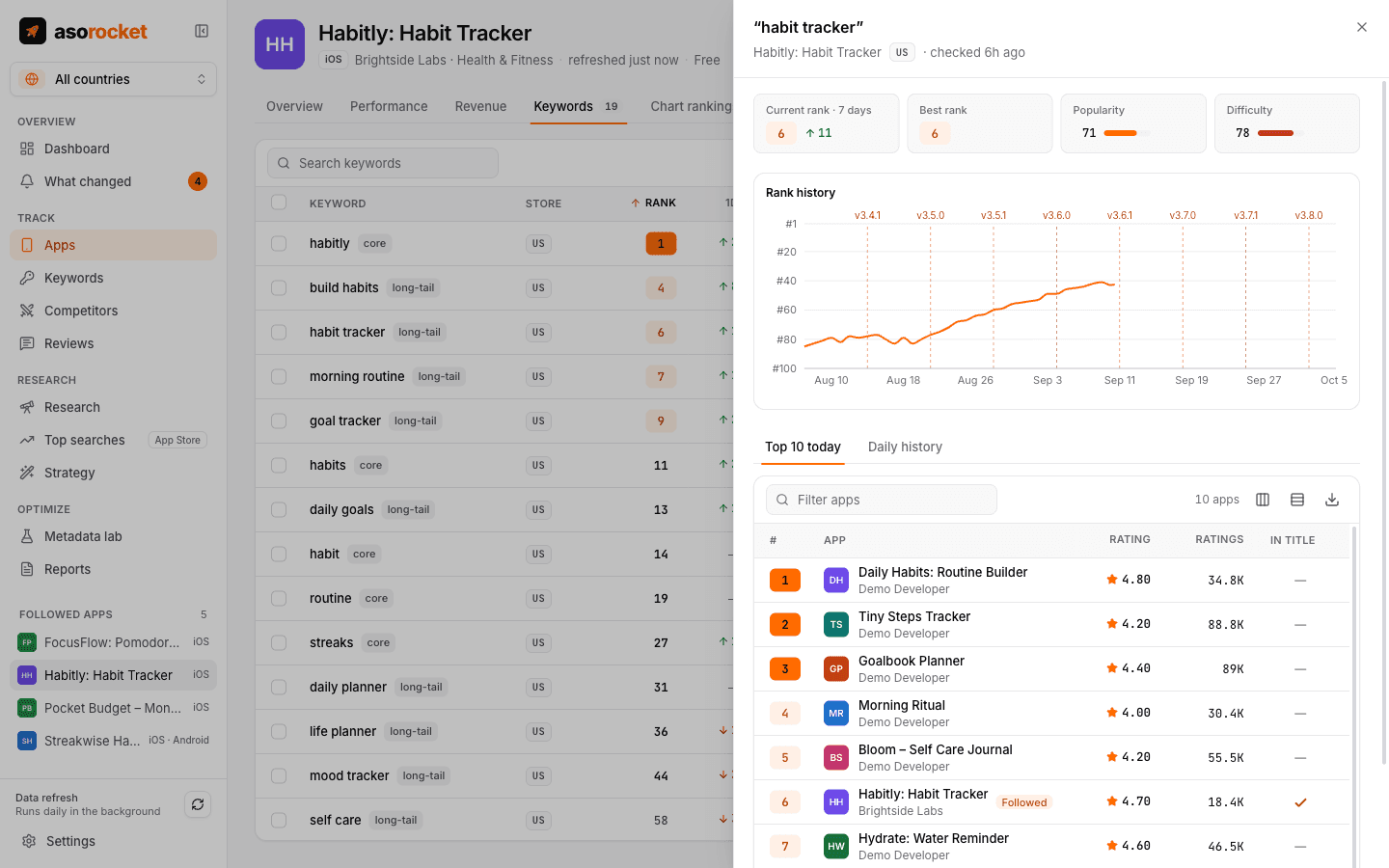
Each keyword keeps its full rank history and today’s top 10.
Good to know
Where the ranks come from
App Store ranks come from Apple’s public iTunes Search API, the same source independent ASO tools rely on. Google Play ranks come from the data endpoint Google Play’s own website reads. Both closely track, but can differ slightly from, what a given device shows.
Refreshes on their own
A daily refresh runs in the background while asorocket runs, paced to stay within each store’s rate limits, and catches up after your computer wakes. With Open at login it starts with your computer and refreshes without opening a window.
Related guides
Measurement · 2 min read
How to track App Store keyword rankings
Why searching on your own iPhone misleads you, and how to track ranks daily, per country, against competitors.
Keywords · 2 min read
How to do App Store keyword research
Collect ideas, score them for popularity and difficulty, and pick the keywords your app can actually win.
Keywords · 2 min read
How to localize App Store keywords for other countries
Other storefronts often have far less competition. How to choose countries, research keywords locally and measure the result.
More features
All featuresKeyword research
Score a term, see who ranks, and check up to 1,000 keywords in one background run.
Learn moreMetadata lab
A live ASO score as you type, an automatic keyword field, and a pressure test before you ship.
Learn morePublish to App Store Connect
Push a checked draft into the version you’re preparing, after a careful review screen.
Learn moreLocalization planner
Find the empty keyword fields in the extra languages each storefront indexes, and fill them.
Learn moreStart with your own app, today
Download asorocket, pick your markets and find your app. You will be tracking your first keywords in about two minutes.
macOS · Windows · Linux