App Store keyword search volume: how to check popularity
Apple has no public search volume. Here is what you can use instead, and how reliable each source is.
Published · Updated · 4 min read
Apple does not publish App Store search volume. The closest official figure is the 1 to 100 popularity score Apple Ads publishes weekly for its most searched terms per storefront and genre; for every other keyword, use autocomplete position and tool estimates, and treat them as relative, not absolute.
Apple’s own popularity scores (Apple Ads)
Apple Ads exposes search popularity for App Store terms. Through the Apple Ads API, Apple publishes its most searched terms for each storefront and genre every week, with a popularity score from 1 to 100, overall and within the genre, going back to October 2025.
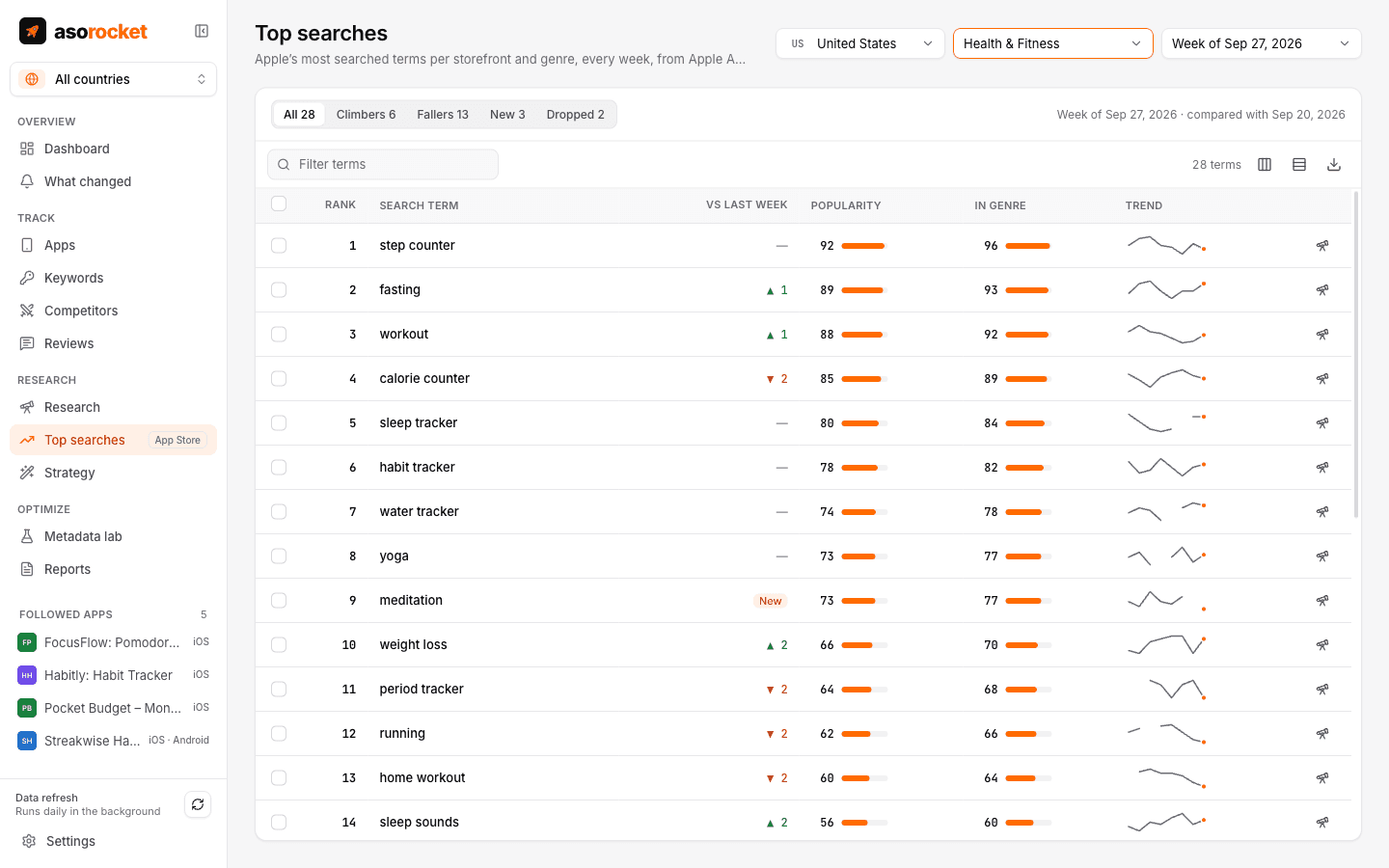
A week of Apple’s top search terms in asorocket, with Apple’s popularity score per term.
- Accurate: it comes from Apple’s own search data.
- Limited to top terms: a few hundred terms per genre and storefront each week. Long-tail keywords won’t appear.
- Needs an Apple Ads account with an API user. Running campaigns should not be necessary, but check with your own account.
Watching how those terms move week to week shows seasonal demand and new trends early: a term climbing in your genre is a hint to add it before competitors do. asorocket’s top search terms shows climbers, fallers, new and dropped terms for each week.
Reading the 1 to 100 scale
The score is a rank-like number, not a count. Apple does not say how many searches a 70 stands for, and the scale is not linear: the gap between 90 and 80 is far more searches than the gap between 40 and 30, because a handful of terms at the top take most of the traffic in every genre. Two consequences follow. A term in the 80s or 90s is a head term that the biggest apps in the genre own, and a term in the 30s or 40s can still bring a steady stream of installs to an app that ranks in its top 5. And a score is only meaningful next to other scores from the same week, storefront and genre: a 45 in Germany is not comparable to a 45 in the United States, and a term’s overall score and its score within your genre can differ a lot when the word means something else in other categories.
Suppose the list for your storefront and genre shows “habit tracker” at 72, “daily planner” at 58 and “streak” at 31, while your tracked term “routine builder” isn’t listed at all. The first is the head term, which you aim at with your name; the second is reachable and popular enough for the subtitle; the third is a long-tail word for the keyword field; and the fourth gets a tool estimate, because it never made Apple’s list. That is the whole use of the score: putting terms in order, not predicting installs.
Autocomplete signals
The App Store’s search suggestions are drawn from real searches. A term that appears after typing two or three letters is searched more than one that needs the full word. This works for any keyword, but it is a coarse signal.
- Type the first two letters of a seed word and note the order of the suggestions; the first few are the most searched terms starting that way.
- Repeat per storefront: suggestions are per country and language, and so is demand.
- A term that never appears in suggestions can still have searches; it means the demand is small next to the terms that do appear.
Estimates from ASO tools
ASO tools, asorocket included, blend signals like these into a 0–100 popularity estimate for keywords Apple doesn’t list. Estimates are useful for comparing two keywords, and less useful as absolute numbers. A good tool tells you which number is Apple’s and which is its own; asorocket shows both side by side.
| Source | Coverage | Accuracy | Cost |
|---|---|---|---|
| Apple Ads popularity | Top terms per genre and storefront | High, from Apple | Apple Ads account |
| Autocomplete | Any keyword | Coarse | Free |
| Tool estimates | Any keyword | Relative, not absolute | Depends on the tool |
How the three sources compare on one keyword
| Question | Apple Ads score | Autocomplete | Tool estimate |
|---|---|---|---|
| Is this term searched at all? | Yes, if listed | Yes, if suggested | Yes, always answers |
| Is it bigger than that other term? | Yes, same week and genre | Roughly, by position | Yes, as an ordering |
| How many searches a month? | No | No | No |
| Does demand change over the year? | Yes, week by week | Only by rechecking | Depends on the tool |
| Long-tail terms? | No | Yes | Yes |
The practical order is Apple’s score where it exists, autocomplete to confirm a term is searched at all, and the tool estimate to rank the rest. When a tool’s estimate and Apple’s score disagree about which of two terms is bigger, trust Apple.
Using popularity well
- Never pick a keyword on popularity alone: weigh it against difficulty and relevance.
- Compare within a storefront. A 40 in Germany is not comparable to a 40 in the United States.
- Recheck seasonal terms: “tax”, “fitness” and “planner” move with the calendar.
- Popularity says nothing about conversion. A popular term that doesn’t describe your app brings views that don’t install, and can pull your conversion rate down.
Related questions
Does Apple publish App Store search volume?
No. Apple publishes popularity scores (relative, 1–100) for its top search terms through Apple Ads, but not absolute search counts.
Do I need to spend money on Apple Ads to see popularity?
You need an Apple Ads account with an API user. Running campaigns should not be required, but confirm this with your own account.