How to track App Store keyword rankings
Why searching on your own iPhone misleads you, and how to track ranks daily, per country, against competitors.
Published · Updated · 5 min read
Track App Store keyword rankings by recording your app’s position in the top 200 results for each keyword, in each storefront you sell in, once a day, next to two to five competitors, and read the 7- and 30-day change rather than the daily number. Your own iPhone shows one personalised storefront with no history, so the recording has to come from the search API or a tool that queries it. Your keyword rank is your app’s position in the results for a given search in a given storefront, and it is the most direct measure of whether your ASO work is paying off: a release that put the right words in the right fields shows up as ranks moving within days, and one that dropped a word shows up just as fast.
Why searching on your iPhone isn’t enough
- Results can be personalized: apps you have installed or bought may be shown differently.
- You only see one storefront: the one your Apple Account belongs to.
- Scrolling to position 87 for 50 keywords every day isn’t realistic.
- You get a snapshot, with no history to compare against.
How rank trackers work
Rank trackers query App Store search for each keyword and storefront, usually through Apple’s public iTunes Search API, which returns up to 200 results. They record your position (or “not in the top 200”) once a day and keep the history. Positions from the API closely track what devices show, though individual results can differ slightly.
The depth matters more than it sounds. Most apps start far below the first page for the keywords they want, and the first sign that a change worked is a move from 140 to 90, which nobody would ever scroll to. A tracker that reads to 200 shows that movement; one that reads the top 10 or 50 shows nothing until you arrive.
What to track
- Every keyword in your metadata, to see what your name, subtitle and keyword field actually rank for.
- Candidates for your next update, so you know where you start.
- The same keywords for two to five competitors, to see who you are up against.
- Each storefront you care about, separately.
A worked example
Take a habit tracker that ships a new subtitle, “Daily routine & goal planner”, on the 3rd of the month. Before the release, it tracked “habit tracker” at 41, “daily planner” at 160 and “goal tracker” as not in the top 200 in the United States. By the 6th, Apple has indexed the new version: “daily planner” is at 70 and “goal tracker” appears at 130, while “habit tracker” holds at 40. Two weeks later “daily planner” sits at 55 and “goal tracker” at 95. The release did what it was meant to; the words were indexed, and the new ranks are climbing as downloads from them come in.
Now take the same release in Germany. “habit tracker” was at 12 before and is at 30 after, because the English subtitle replaced a German one that carried “gewohnheiten”. Nothing about the US numbers warned of that; only tracking each storefront separately does. The fix is a German subtitle in the next version, and the German ranks are the ones to watch when it ships.
Reading the changes
| What you see | Likely reason |
|---|---|
| Many keywords rise together after a release | Your new metadata was indexed |
| Many keywords fall together | A metadata change dropped words, or a competitor update |
| One keyword jumps and falls back daily | Normal volatility, especially below position 50 |
| Gradual rise across the board | More downloads and better ratings helping you overall |
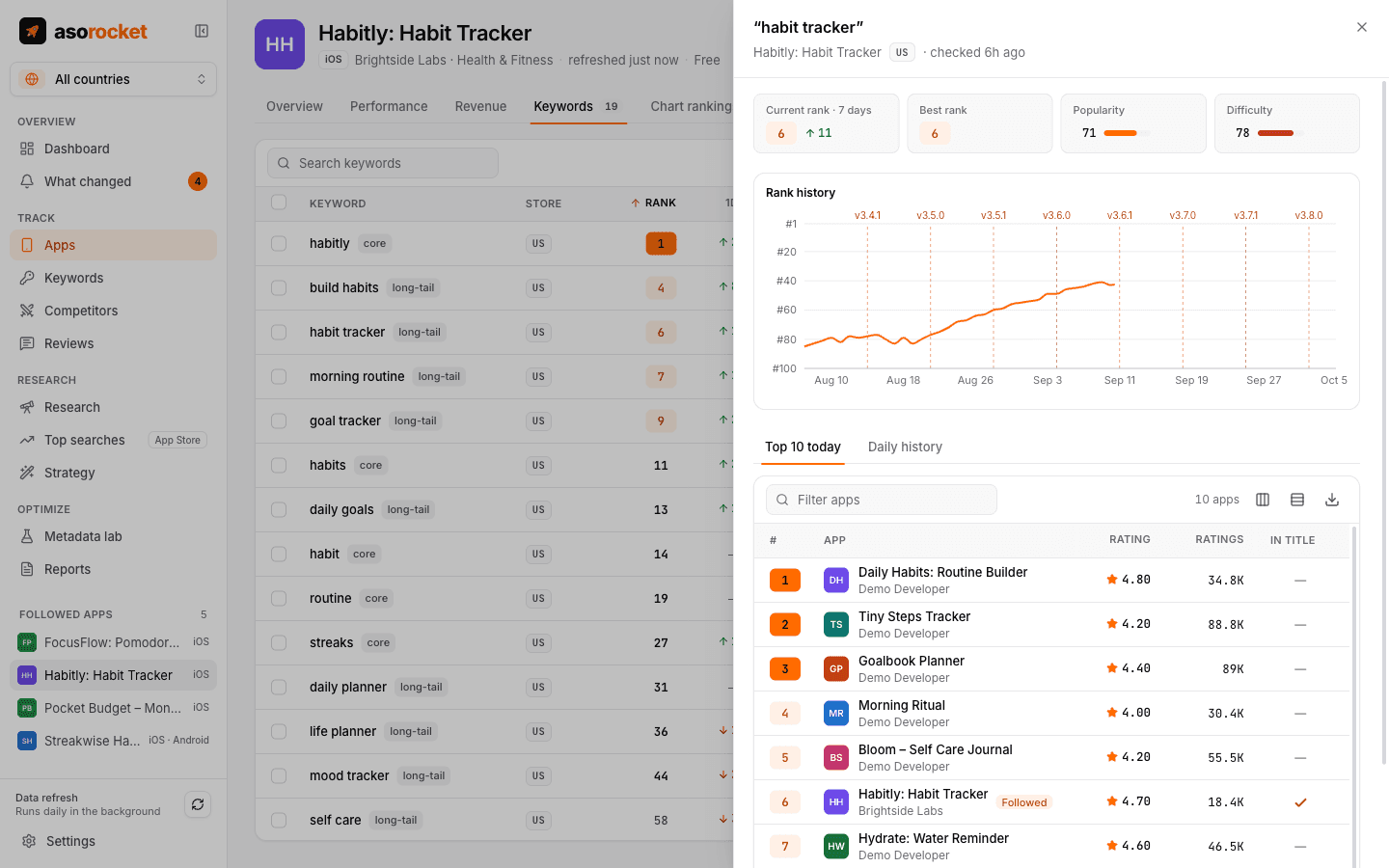
A keyword’s rank history in asorocket, with the release marked on the day it shipped.
Daily vs weekly checks and rank volatility
App Store ranks move every day, and the lower the position the more they move. A keyword at 4 will sit between 3 and 6 for weeks; a keyword at 120 can show 95 one day and 150 the next without anything having changed on your side. Apple reorders results as downloads, ratings and competitors’ releases come in, and the search API itself can return slightly different lists from one request to the next.
- Check daily, decide weekly. A daily check keeps the history complete and catches a sudden drop the day it happens; decisions about metadata should rest on the 7 and 30-day changes.
- Weight the top 50. Moves inside the top 50 are meaningful; moves between 100 and 200 are mostly noise until a trend holds for a week or two.
- Watch groups, not single keywords. Ten keywords moving the same way is a signal; one keyword moving on its own usually isn’t.
- Mark your releases. A rank change means little until you know whether a version shipped, a competitor updated, or neither. Keep a release marker on the chart.
Tracking the same keyword across storefronts
The App Store has 175 storefronts, and each has its own results, its own competitors and its own indexed localizations. The same keyword can be a top-10 rank in Sweden and nowhere in the United States, and an English keyword can rank in Germany because the German storefront indexes more than one localization. Track each storefront you earn downloads from on its own, and compare the same keyword across them: where it is popular but the top results are weak, you have a storefront worth a localized keyword field; where you already rank well, you have words to protect in the next version.
| Storefront | The example app’s rank for “habit tracker” | What it suggests |
|---|---|---|
| United States | 41 | Crowded; a long climb ahead |
| Germany | 12 | Protect the words that got you here |
| Brazil | 6 | Localize the rest of the field; the competition is thin |
| Japan | Not in the top 200 | Translate the term first; English may not be what people type |
Tracking with asorocket
Keyword rank tracking checks each keyword daily in any of the 175 storefronts, records your position in the top 200 alongside your followed competitors, and shows 1, 7 and 30-day changes with a 30-day sparkline. Google Play apps are tracked the same way within Google Play’s 30 results; see how to track Google Play keyword rankings for what differs there. The data stays on your computer.
Related questions
How often do App Store rankings change?
Continuously. Checking once a day is enough to see trends; reacting to single-day moves usually isn’t worth it.
Why don’t I appear for a keyword in my keyword field?
Being indexed only makes you eligible. With many competing apps, you may rank below 200 until your downloads and ratings grow, or the term is too competitive for now.