Competitor tracking for App Store and Google Play apps
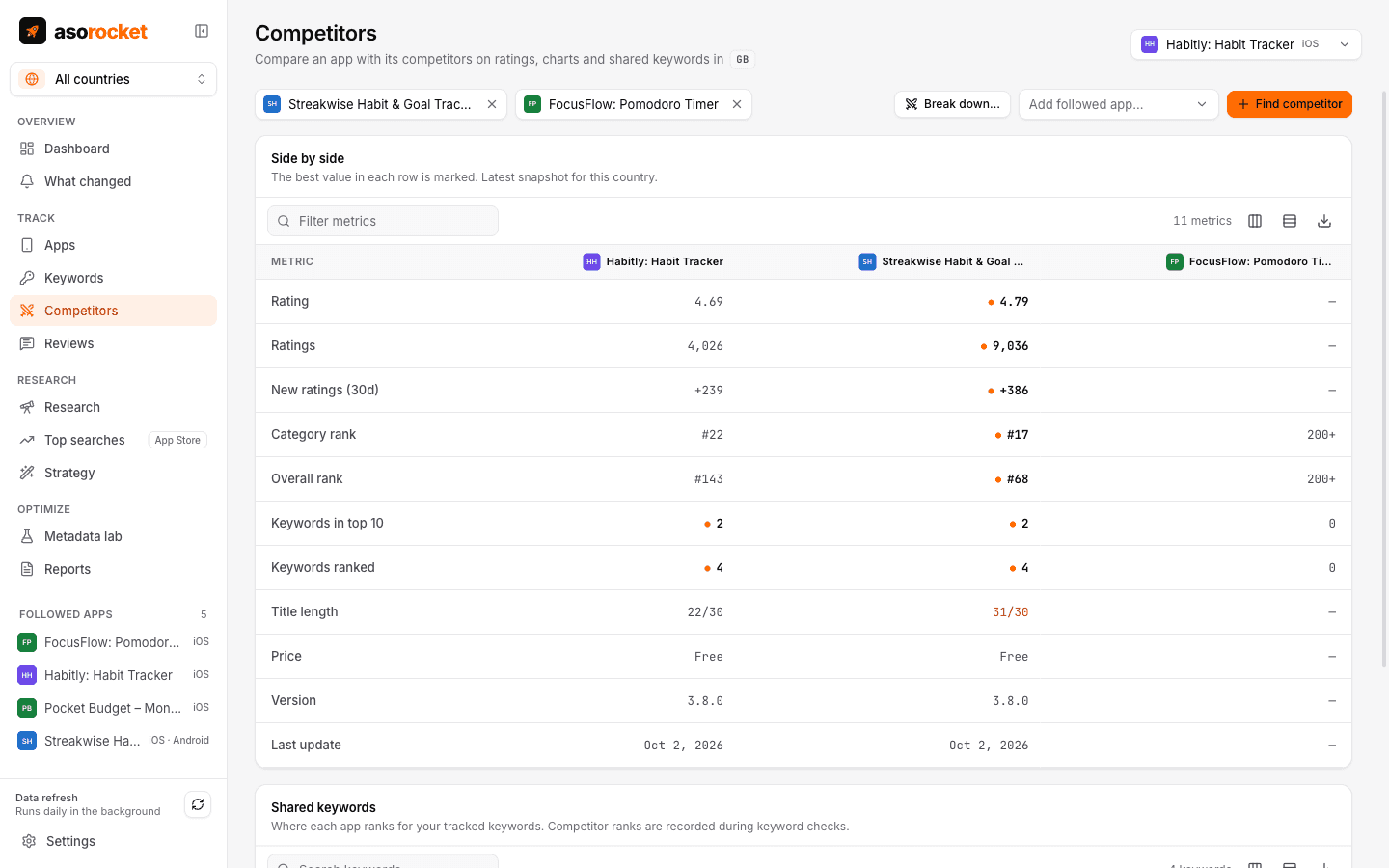
Competitor tracking follows the apps you compete with: asorocket records their chart positions, ratings and releases every day and where they rank for your keywords, so you can compare side by side and spot the gaps.
What you get
Shared keyword ranks
Where each competitor ranks for every keyword you track, recorded with your own checks at no extra cost.
Keyword gaps
Keywords where a competitor ranks in the top 50 and you rank lower or not at all.
Chart positions
Top Free, Top Paid and Top Grossing, overall and in the category, tracked daily.
Daily snapshots
Rating, rating count, version, price and metadata history, with alerts and a timeline when a competitor changes its title, price, description or screenshots.
Reviews
Recent reviews with rating distribution and filters, for your app and theirs. On Google Play, each review shows the developer’s reply.
Competitor breakdowns
Optionally, a written breakdown of a competitor’s positioning, audience, strengths and weaknesses, with the evidence for each point.
Either store
Follow competitors on the App Store or on Google Play. An app is compared with competitors in its own store, on the keywords you track there.
How to pick competitors
Pick the apps that take your downloads, not the biggest names in the category: the ones that rank for your keywords and that your users would compare you with. The guided setup suggests them from the apps that show up when people search for your main keyword in your market, and you can add more at any time by link or name. Three or four per app is usually enough; every daily keyword check also records where each of them ranks, so a longer list costs nothing extra but makes the comparison noisier. On Google Play, follow competitors there: an app is compared with rivals in its own store. The competitor analysis guide shows how to find your real competitors.
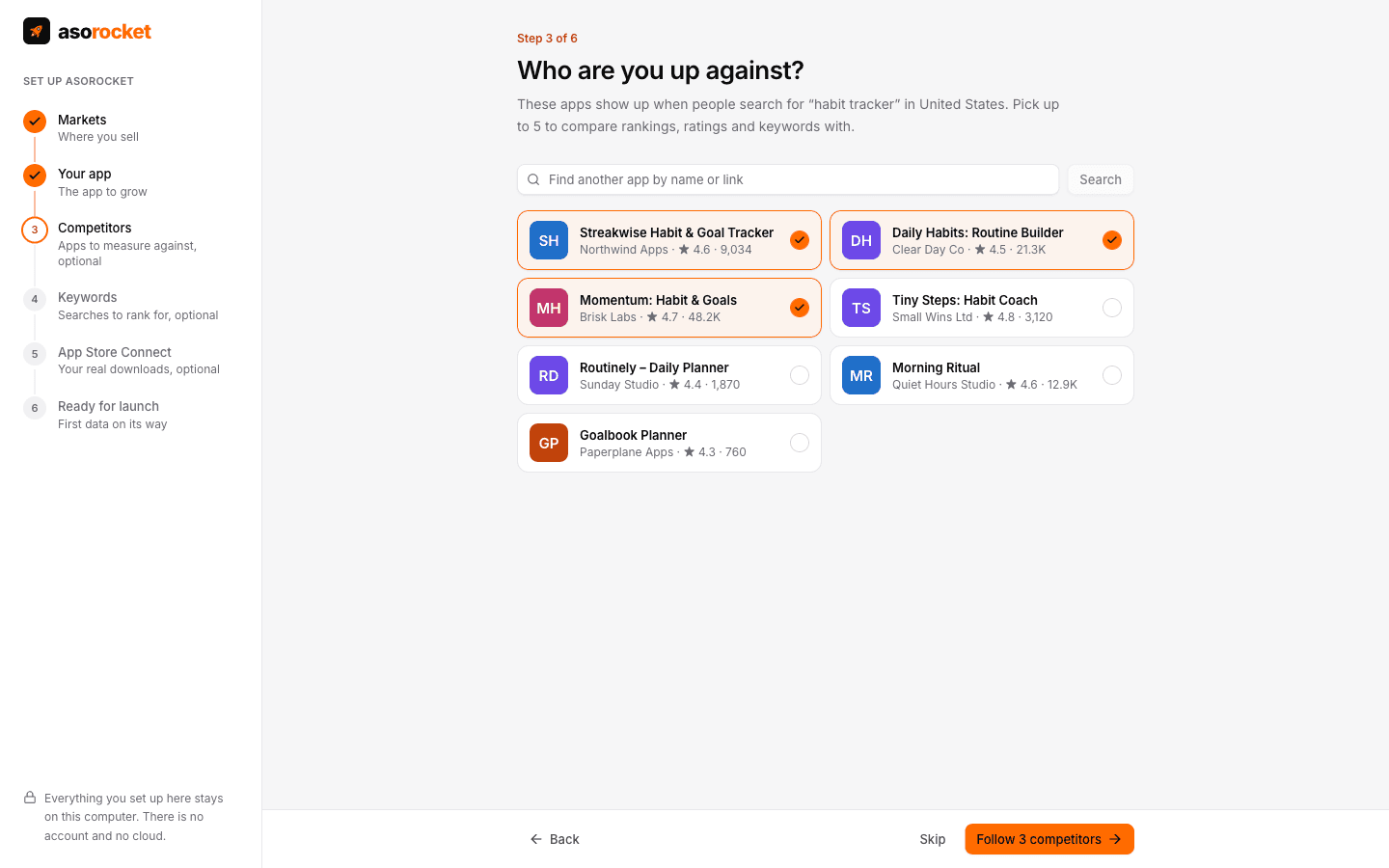
Setup suggests competitors from the apps that rank for your keyword. Pick up to five.
Finding keyword gaps
A keyword gap is a term where a competitor ranks in the top 50 and you rank lower or not at all. asorocket lists them per competitor from the keywords you already track, and bulk research widens the net: run the competitor’s name and the terms it ranks for through a research run to find words you have not considered. The gaps that matter are the ones with popularity you can realistically reach; the Metadata lab shows whether a candidate fits your title, subtitle or keyword field without dropping a keyword you already rank for, and a seed keyword strategy turns a competitor’s strongest term into a scored list of its own.
What changes when a competitor moves
Competitors are checked every day, so the comparison is a timeline rather than a snapshot. When one changes its title, price, description or screenshots, What changed lists it after the next refresh with a word-by-word diff, and Impact shows what happened to its ranks on your keywords in the days after. A competitor climbing the charts after a release shows up in the chart history, and a wave of low-star reviews shows up in its review topics. All of this can go to a Slack or Teams channel through alerts, so the people who never open asorocket still hear about it.

Chart positions over time, overall and in the app’s category.
Questions about Competitor tracking
Will it tell me when a competitor changes its listing?
Yes, in either store. After every refresh, What changed lists competitors’ new titles, prices, descriptions and screenshots, alongside your own rank moves and new low-star reviews, and one desktop notification a day sums it up, or a message in Slack, Teams or Discord. More about listing change tracking and release impact.
How many competitors can I follow?
The free plan follows one app and three competitors; Pro and Studio have no limit. See pricing. Competitor ranks are recorded with your own daily checks, so following more of them does not slow the refresh.
Can I track a competitor on Google Play?
Yes. Follow it by link, name or package name and it is compared with your Google Play app on the keywords you track there, to position 30. App Store apps are compared with App Store competitors.
Do I need to track a keyword for competitors separately?
No. Every daily check of a keyword you track records where each followed competitor ranks for it, without an extra request, so the comparison always covers your own keyword list.
Related guides
Measurement · 4 min read
How to analyze competitors on the App Store
Find the apps you really compete with, then compare keywords, metadata, ratings and reviews to find gaps.
Measurement · 5 min read
How to track App Store keyword rankings
Why searching on your own iPhone misleads you, and how to track ranks daily, per country, against competitors.
Metadata · 4 min read
App Store title and subtitle: limits and how to write them
Thirty characters each. How to fit a brand, a keyword and a reason to download.
More features
All featuresKeyword rank tracking
Daily positions for every keyword in the App Store’s top 200 and Google Play’s top 30, with changes and history.
Learn moreWhat changed and impact
Daily alerts, competitors’ listing changes, a visibility score, and the impact of each release.
Learn moreApp Store Connect analytics
Impressions, page views, downloads and conversion for your apps, from Apple’s own reports.
Learn moreRevenue from RevenueCat
Revenue, MRR, subscriptions and trials per app from RevenueCat, next to rankings and releases.
Learn moreStart with your own app, today
Download asorocket, pick your markets and find your app. You will be tracking your first keywords in about two minutes.
macOS · Windows · Linux