ASO alerts in Slack, Teams and Discord, for your whole team
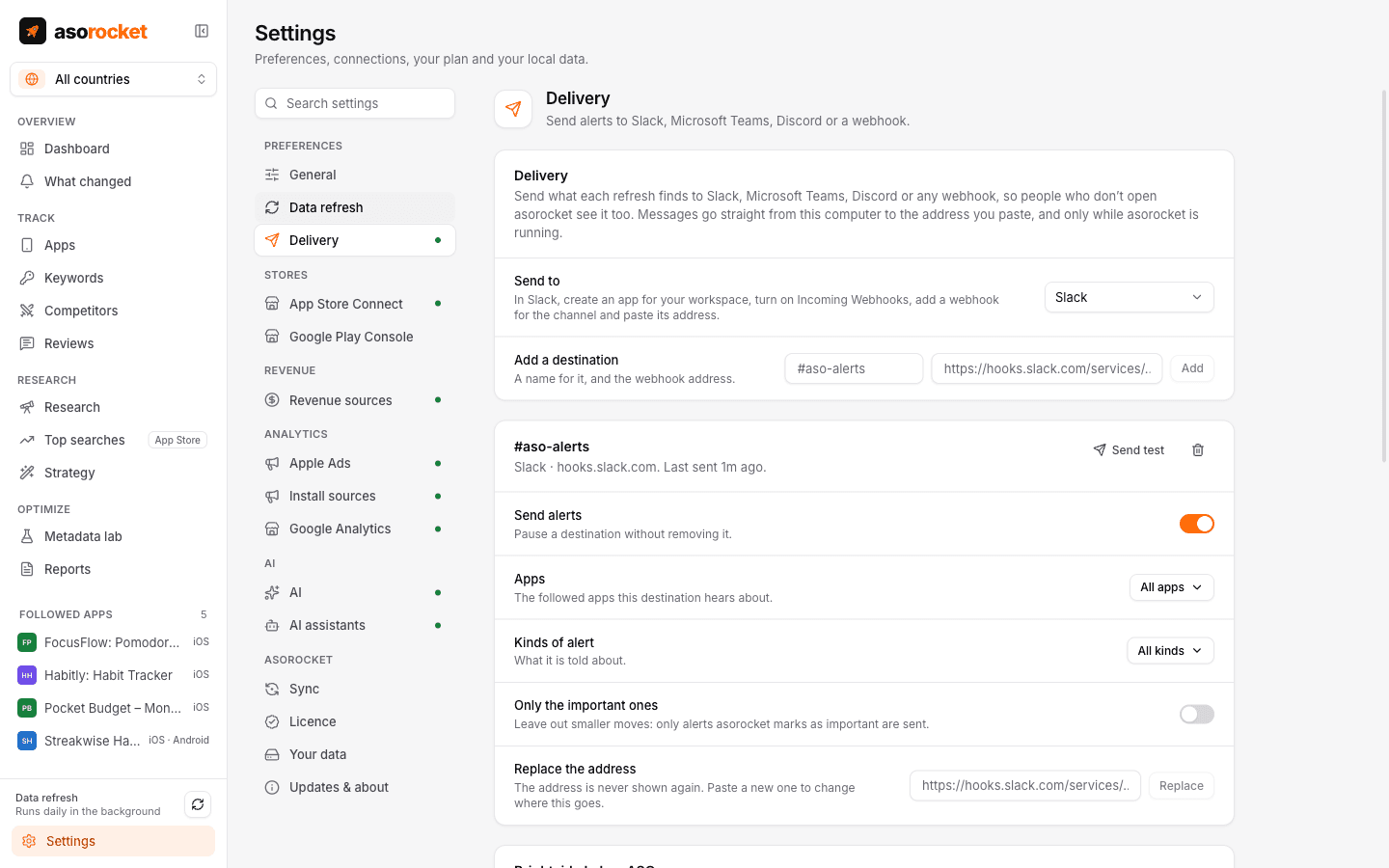
Alert delivery sends what changed after every refresh to a Slack or Microsoft Teams channel, Discord or any webhook, filtered per app and per kind of alert, so each client hears about their own apps and the people who never open asorocket still see what moved.
What you get
Where people already are
Slack, Microsoft Teams and Discord through their incoming webhooks, or any HTTPS address that accepts JSON, for Zapier, Make or your own script.
One channel per client
Each destination picks the apps it hears about, so a client’s channel gets that client’s apps and nothing else.
Only the alerts that matter
Choose the kinds of alert per destination: keyword ranks, chart ranks, reviews, listing changes and visibility, or only the most severe.
Signed webhooks
A plain webhook carries an HMAC-SHA256 signature of its body in the X-Asorocket-Signature header, so your server can check it came from your copy of asorocket.
Delivery you can check
Each destination shows when it last sent and the last error, if there was one.
Addresses kept secret
Webhook addresses are encrypted by your operating system, like your API keys, and never shown again once saved.
What you need: asorocket Pro or Studio (or the trial), and an incoming webhook for Slack, Microsoft Teams or Discord, or your own HTTPS endpoint.
Good to know
Sent from your computer
Alerts go straight from asorocket to the addresses you add. Nothing passes through a server of ours.
After the daily refresh
Alerts are sent when a refresh finds them, and each alert is sent once. The refresh runs while asorocket runs: turn on Open at login and it starts quietly with your computer, refreshes and sends, without opening a window.
Questions about Alerts in Slack, Teams and Discord
Can I send alerts and reports to my clients?
Yes. Alerts go to Slack, Microsoft Teams, Discord or any webhook, each destination with its own apps and kinds of alert, so a client’s channel hears about that client’s apps. With Studio, client reports per app are made on a schedule as a PDF under your own name and logo, saved in a folder you choose, with an email draft to attach it to. Both come from your computer, not through a server of ours.
Will it tell me when a competitor changes its listing?
Yes, in either store. After every refresh, What changed lists competitors’ new titles, prices, descriptions and screenshots, alongside your own rank moves and new low-star reviews, and one desktop notification a day sums it up, or a message in Slack, Teams or Discord. More about listing change tracking and release impact.
Related guides
Measurement · 5 min read
How to track App Store keyword rankings
Why searching on your own iPhone misleads you, and how to track ranks daily, per country, against competitors.
Measurement · 4 min read
How to analyze competitors on the App Store
Find the apps you really compete with, then compare keywords, metadata, ratings and reviews to find gaps.
More features
All featuresClient reports
Scheduled PDF reports per client, under your own brand: rankings, visibility, changes and their impact.
Learn moreSync between computers
A Studio licence’s three computers share what you set up through your iCloud Drive or Dropbox folder.
Learn moreGoogle Play apps
Daily keyword ranks, charts, ratings, installs and reviews for Google Play apps, in the same tables.
Learn morePublish to Google Play
Publish a draft’s texts to your Google Play listing and reply to recent reviews.
Learn moreStart with your own app, today
Download asorocket, pick your markets and find your app. You will be tracking your first keywords in about two minutes.
macOS · Windows · Linux