Google Play
Google Play title, short description and description: limits and how to write them
Three fields, all of them read for search. Their limits, what Google’s policy forbids, and where your keywords belong.
Updated · 2 min read
A Google Play listing has three text fields that matter for search: the title, the short description and the full description. Unlike the App Store there is no hidden keyword field, so everything you want to rank for has to be written where people can read it.
| Field | Limit | Where it shows |
|---|---|---|
| Title | 30 characters | Search results and the top of the listing |
| Short description | 80 characters | On the listing, above the full description |
| Full description | 4,000 characters | When the description is expanded |
Writing the title
- Lead with your brand, then the most valuable keyword that fits: “Streakwise: Habit Tracker”.
- Use the 30 characters. A bare brand name leaves the strongest field empty.
- Leave out what Google’s policy forbids in titles: emoji, words in capitals that aren’t your brand, and claims such as “best”, “#1”, “top”, “free” or “no ads”.
- Don’t add a competitor’s name. It risks removal and rarely ranks.
Writing the short description
The short description is the one line most people read. It has two jobs: say what the app does for someone who hasn’t decided yet, and carry the next keywords after the title.
- Write a sentence, not a list of keywords: “Habit tracker with streaks, goals and reminders”.
- Use words the title doesn’t already have.
- The same policy applies as for the title: no emoji, no capitals for emphasis, no “best” or “free”.
Writing the description
- Start with what matters. The first lines are what people see before they expand the text, so state what the app does and for whom.
- Use the words people search for. Each keyword you target should appear in the description in a sentence that makes sense. If a target keyword appears nowhere in the listing, you are unlikely to rank for it.
- Give it some length. A description of two sentences gives search very little to read. You don’t need all 4,000 characters, but describe the main features in the words your users would use.
- Don’t stuff. A word repeated in every other sentence reads badly and breaks Google’s policy on repetitive keywords. If a paragraph sounds wrong read aloud, rewrite it.
- Structure it. Short paragraphs and a line per feature are easier to read than one block.
A worked example
Title: “Streakwise: Habit Tracker” (25 of 30). Short description: “Habit streaks, routine planner and goal tracker” (47 of 80), which adds streaks, routine, planner and goal without repeating the title’s words more than it needs to. The description then opens with what the app does, and uses “daily routine”, “goal tracker” and “reminders” in ordinary sentences about the features.
Check, publish, measure
Listing texts can change at any time on Google Play, which makes it easy to test: change one field, wait for Google’s review, then watch your ranks for two to four weeks. Before you publish, check that no keyword you already rank for has dropped out of the listing.
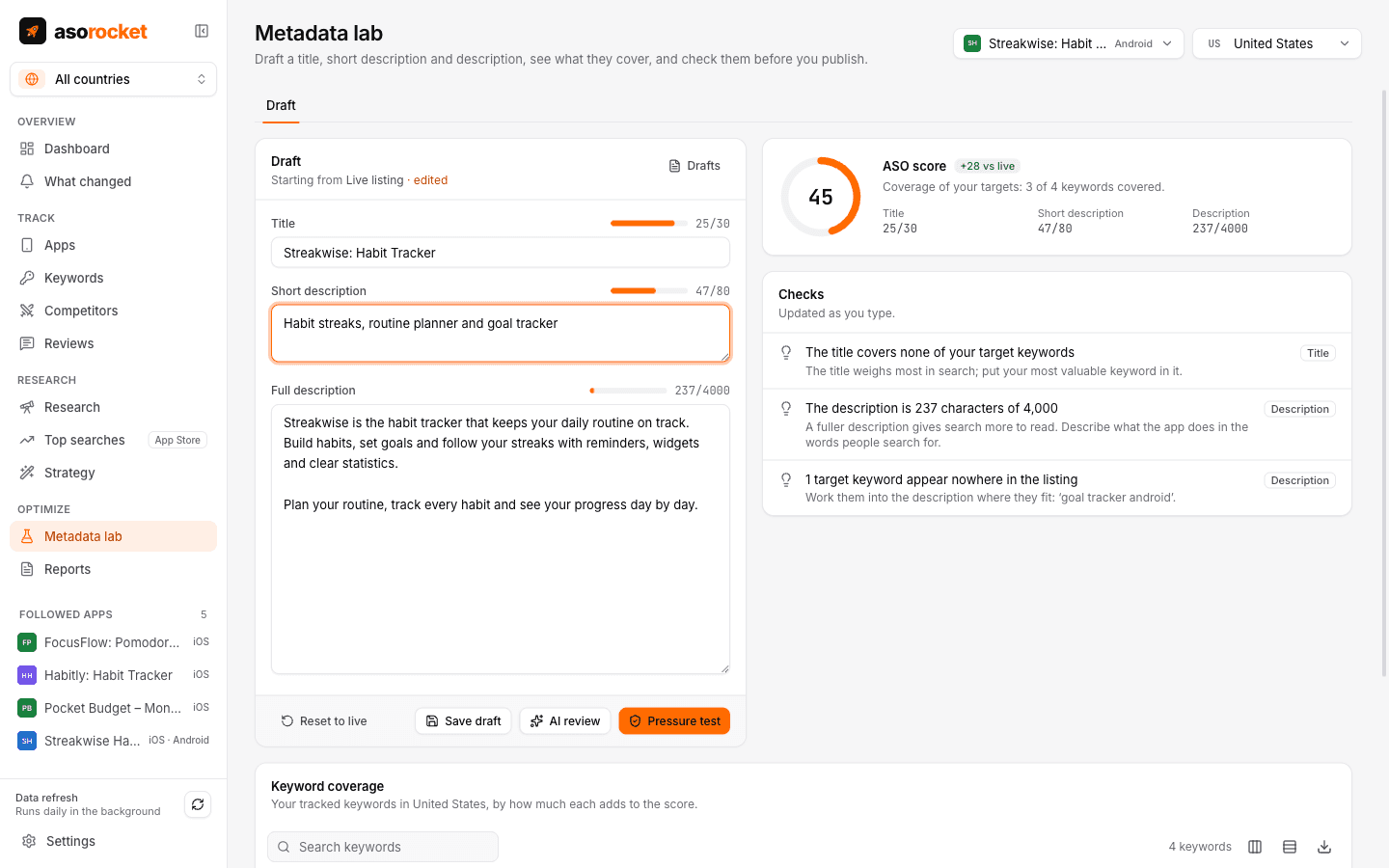
A Google Play draft in asorocket’s Metadata lab, scored and checked as you type.
asorocket’s Metadata lab scores a Google Play title, short description and description against your tracked keywords as you type and checks them by these rules. With Google Play Console connected, it shows the draft next to your current listing and publishes the texts that changed.
Related questions
How long can a Google Play title be?
30 characters. The short description can be 80 and the full description 4,000.
Does the Google Play description affect search?
Yes. Unlike the App Store, Google Play reads the description, so the keywords you target should appear in it naturally.
Do I need a new release to change my Google Play title?
No. Listing texts can be changed in Play Console at any time. Google reviews the change before it shows in the store.