From one seed keyword to an ASO strategy you can ship
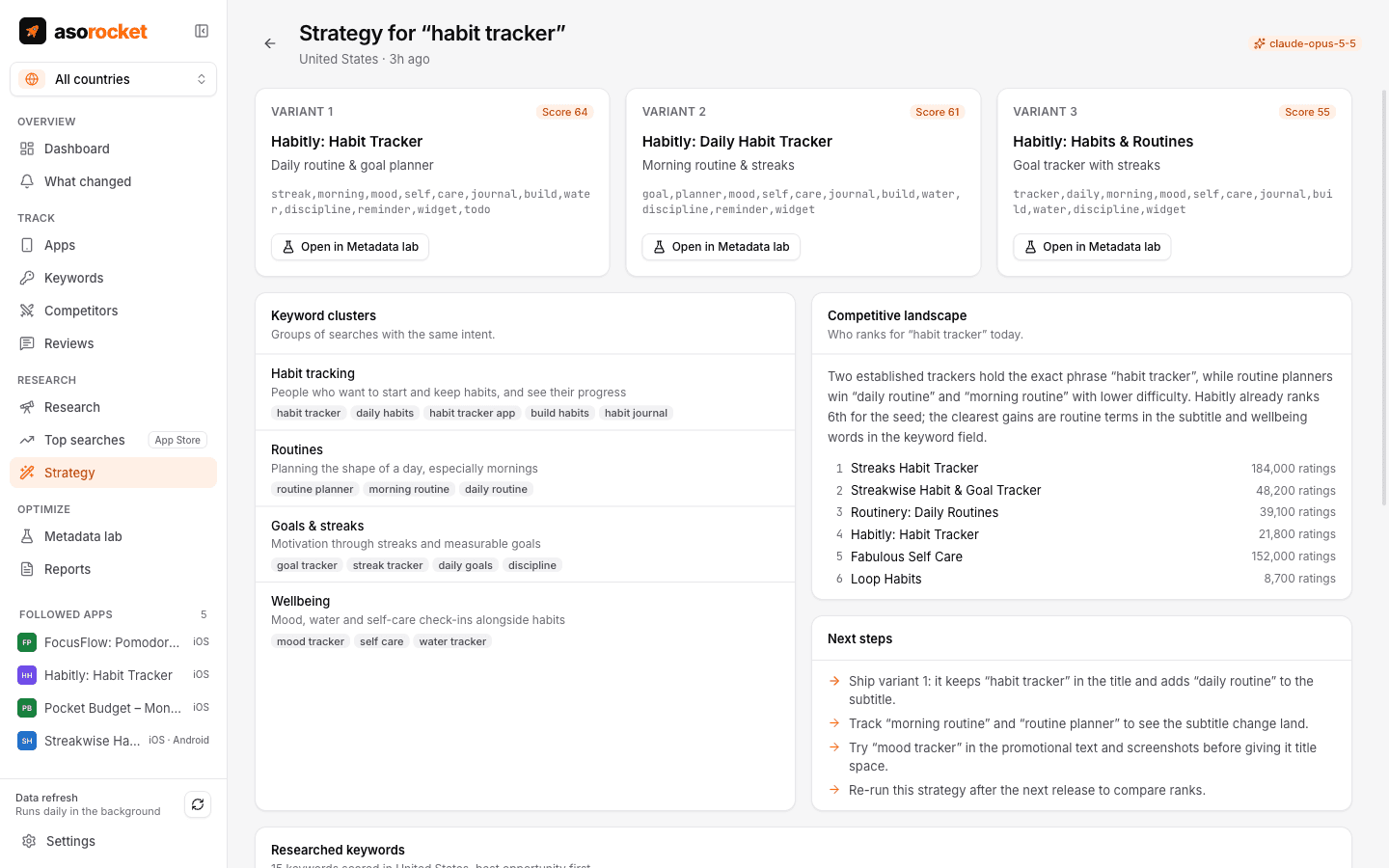
A seed keyword strategy turns one keyword into an ASO plan: give asorocket a seed keyword and a storefront, on the App Store or Google Play, and it collects ideas from the store’s suggestions, Apple’s top searches, your competitors and your own keywords, scores around 60 of them, and drafts metadata that passes the pressure test.
What you get
Real research underneath
Every candidate keyword is measured like any other research: popularity, difficulty and who ranks.
Clusters and priorities
Keywords grouped by intent, ordered by what they are worth to your app.
Metadata that passes the checks
Three variants, each checked by the same rules as the pressure test, then opened in the Metadata lab: title, subtitle and keyword field on the App Store, title, short description and description on Google Play.
Works without AI
Without a model you still get the research, the scores and data-only variants.
Your choice of model
Use your own key for Anthropic, OpenAI, Google Gemini or OpenRouter, any OpenAI-compatible endpoint, or a local model through Ollama or LM Studio.
Saved and resumable
Reports are saved, survive restarts and can be exported as Markdown or CSV.
From one seed keyword to a scored list
Give the strategy a seed keyword such as “habit tracker” and a storefront. It gathers candidates from four places: the store’s own search suggestions, Apple’s top search terms in the app’s genre when Apple Ads is connected, the keywords your followed competitors rank for, and the keywords you already track. Around 60 of them are then researched like any other keyword: popularity, difficulty, the number of results and who ranks today. The result is a list you can sort by what each term is worth to your app, not a list of ideas you still have to check, and the keyword research guide explains how those scores are read.
Clusters, drafts and the pressure test
Keywords are grouped by intent, so “habit tracker”, “daily habits” and “routine planner” land in one cluster and “focus timer” in another, and each cluster is ordered by its value to your app. From the clusters the strategy drafts three metadata variants: title, subtitle and keyword field for the App Store, or title, short description and description for Google Play. Every variant runs through the same checks as the Metadata lab’s pressure test, so a draft that repeats a word, overruns a limit or drops a keyword you rank for is caught before you see it. Open a variant in the lab to edit it, then publish it from there.
With or without AI
The research, scores and clusters come from data, and so do the data-only variants, so a strategy works with no model configured. An AI model adds the written parts: competitor breakdowns with evidence for every claim, a review of your draft, and variants that read naturally rather than as packed keyword lists. Use your own key for Anthropic, OpenAI, Google Gemini or OpenRouter, any OpenAI-compatible endpoint, or a local model through Ollama or LM Studio, in which case nothing leaves your computer. Reports are saved, survive restarts and export to Markdown or CSV, and the MCP server lets Claude or Cursor start one for an App Store app.
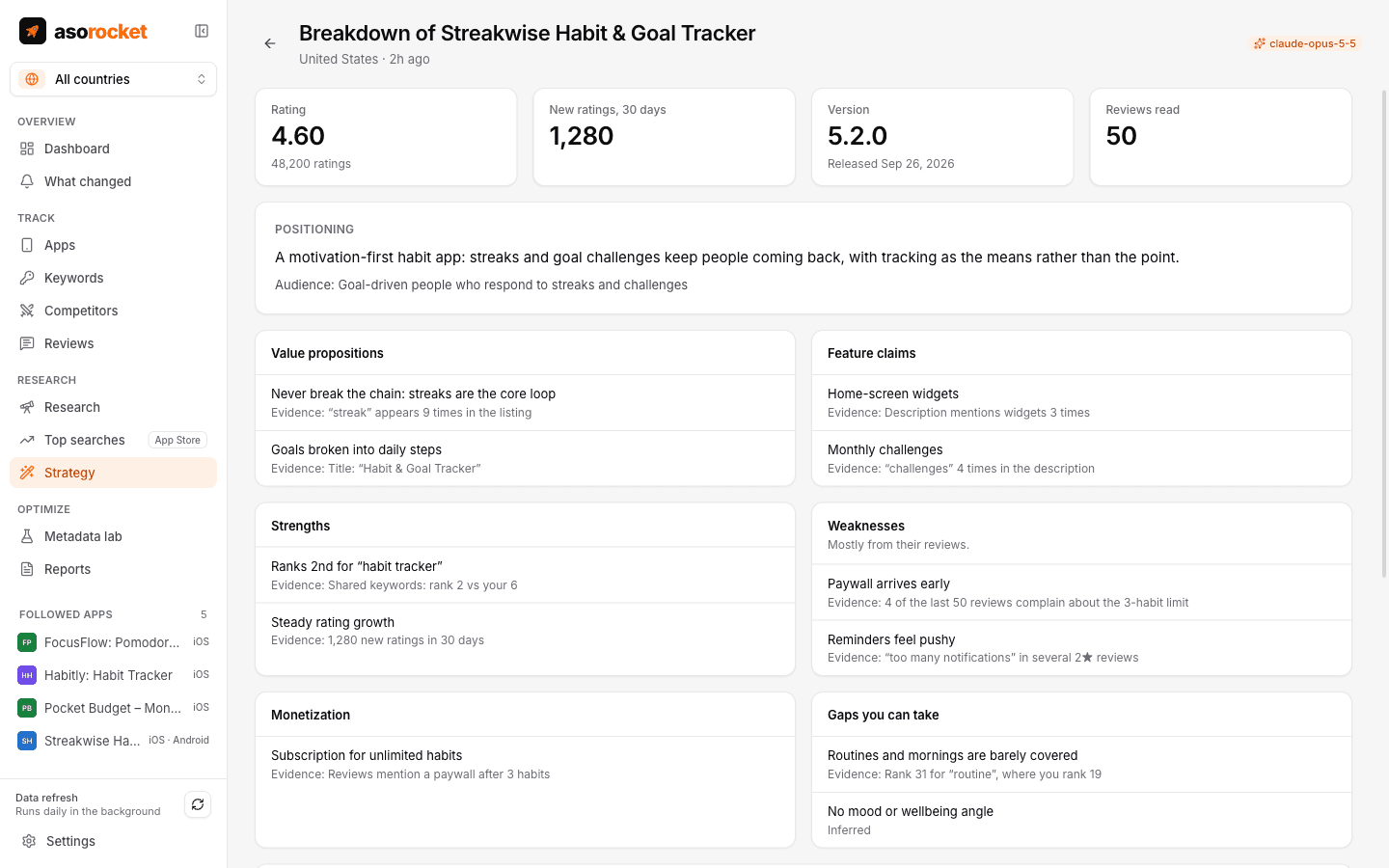
Competitor breakdowns put each claim next to its evidence.
Good to know
Both stores
A strategy for a Google Play app writes Google Play’s fields and checks them by Google Play’s rules. Apple’s top searches feed App Store strategies only. Competitor breakdowns and the AI review of a draft work in both stores.
Questions about Seed keyword strategy
Do I have to use AI?
No. Every feature works without it. AI is optional and adds written strategies, competitor breakdowns and reviews of your drafts, using your own provider key or a local model.
How many keywords does a strategy research?
Around 60 per run, chosen from the store’s suggestions, Apple’s top searches, your competitors and your own keywords. Each is scored with the same popularity and difficulty as single keyword research. For longer lists, run a bulk research run of up to 1,000 keywords.
Does it work for Google Play apps?
Yes. A strategy for a Google Play app writes Google Play’s title, short description and description and checks them by Google Play’s rules. Apple’s top searches feed App Store strategies only.
Which AI providers can I use?
Anthropic, OpenAI, Google Gemini or OpenRouter with your own key, any OpenAI-compatible endpoint, or a local model through Ollama or LM Studio. Without any of them you still get the research, the scores and data-only variants.
Related guides
Keywords · 3 min read
How to do App Store keyword research
Collect ideas, score them for popularity and difficulty, and pick the keywords your app can actually win.
Measurement · 4 min read
How to analyze competitors on the App Store
Find the apps you really compete with, then compare keywords, metadata, ratings and reviews to find gaps.
More features
All featuresKeyword research
Score a term, see who ranks, and check up to 1,000 keywords in one background run.
Learn moreApple’s top search terms
Apple’s own weekly top searches per storefront and genre, with official popularity and movers.
Learn moreMetadata lab
A live ASO score as you type, an automatic keyword field, and a pressure test before you ship.
Learn morePublish to App Store Connect
Push a checked draft into the version you’re preparing, after a careful review screen.
Learn moreStart with your own app, today
Download asorocket, pick your markets and find your app. You will be tracking your first keywords in about two minutes.
macOS · Windows · Linux