How to localize App Store keywords for other countries
Other storefronts often have far less competition. How to choose countries, research keywords locally and measure the result.
Published · Updated · 4 min read
Pick the storefronts where your category already gets downloads or where competition is thin, research keywords in each local language from local autocomplete and competitors rather than translating your English list, add them through that storefront’s localizations, then track ranks per storefront to see what moved. The App Store has 175 storefronts; most apps compete hard in one or two and leave the rest on default English metadata, which makes localization one of the cheapest ways to reach more people.
Where to start
- Countries where you already get downloads without trying (App Store Connect shows downloads by country).
- Large storefronts in languages your app already supports.
- Storefronts where your main keyword is popular but the top results are weak or untranslated.
Prioritizing storefronts by downloads and competition
You can’t localize 175 storefronts at once, and you shouldn’t: each one needs its own research, its own tracking and, to convert, its own screenshots. Rank them on two things. Download share is what the storefront could be worth: App Store Connect’s downloads by territory for your own app, and the size of the top apps in your category there, which you can read from their rating counts. Competition is what it would cost: check your main keywords in that storefront and look at who ranks in the top 10 and whether they are localized at all. A large storefront where the top results are English-only apps with few local ratings is the best case; a large storefront where local apps with hundreds of thousands of ratings own every term is a long project; a small storefront with thin competition is a quick win that won’t move your totals much.
| Storefront | Potential | Competition | Do it |
|---|---|---|---|
| Large, your category strong, top apps untranslated | High | Low | First |
| Large, local leaders with many ratings | High | High | Later, one term at a time |
| Small, weak results | Low | Low | When the field is cheap to fill |
| Small, strong local apps | Low | High | Skip for now |
Research, don’t just translate
A literal translation of your English keywords often misses how people search. Germans may search an English loanword; Japanese users mix scripts; Brazilians use different words from Portuguese speakers in Portugal. For each storefront:
- Translate your seed keywords, then check the local autocomplete for each.
- Look at the names and subtitles of the local top 10.
- Score the candidates for popularity and difficulty in that storefront specifically.
- Write a localized name, subtitle and keyword field from the winners.
Extra localizations per storefront
ASO practitioners have long observed that some storefronts index more than one localization. The best-known example is the United States, where Spanish (Mexico) metadata appears to count alongside English (U.S.). Apple doesn’t document this mapping, so treat it as an opportunity to test rather than a rule: use the extra localization for additional keywords and measure whether you rank for them. asorocket’s localization planner lists the localizations each storefront is observed to index, shows which of your keywords each one covers, and proposes keyword fields for the rest.
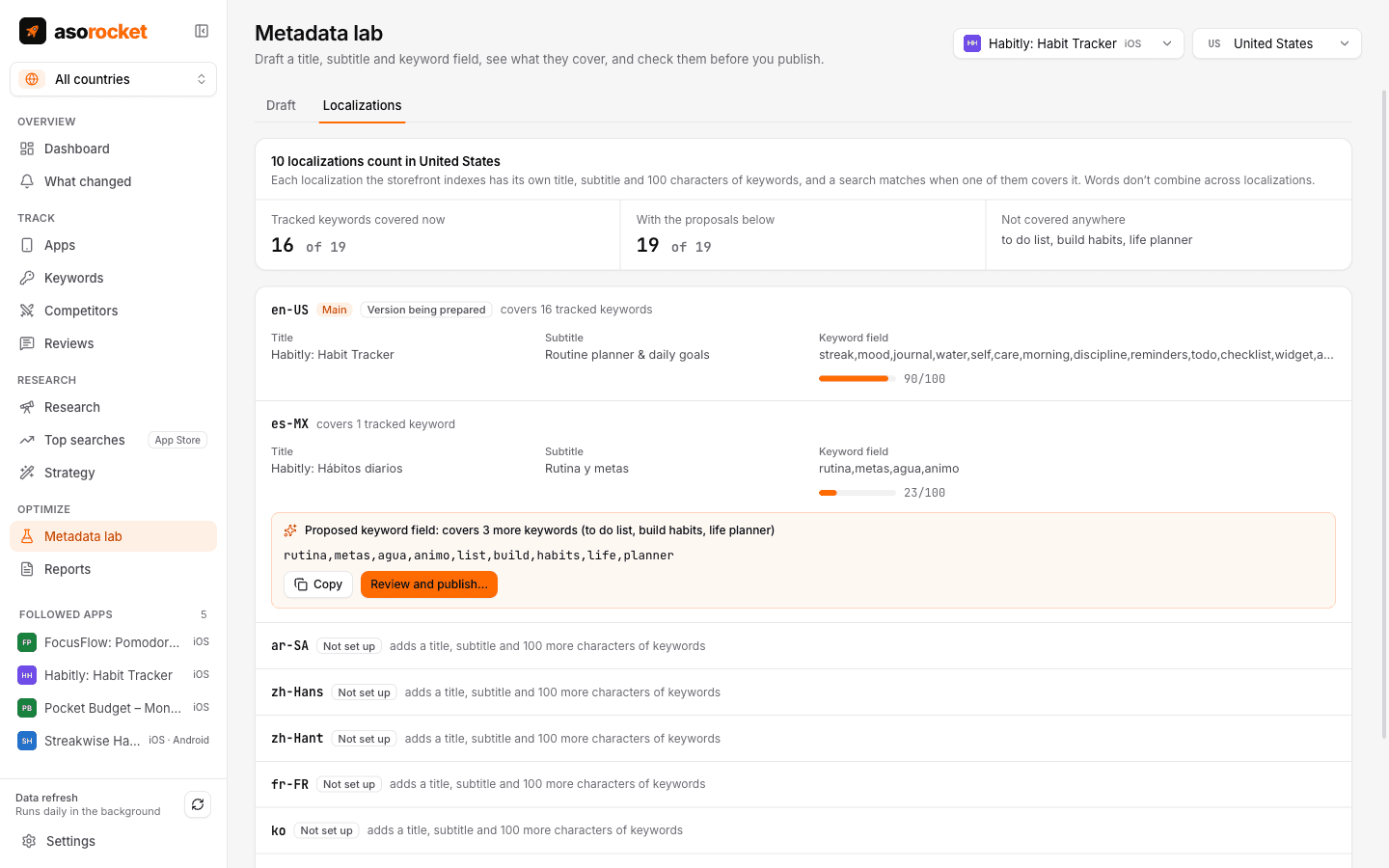
The localization planner: each localization a storefront indexes, its keyword coverage, and a proposed field for the empty ones.
A worked example: the United States storefront
A habit app sells mainly in the United States, where its English (U.S.) keyword field is full: streak,reminder,journal,mood,water,focus,self,care,discipline,todo,checklist,widget,morning,sleep (97 of 100). Its tracked list has twenty more words it would like to index, and no room. The Spanish (Mexico) localization is empty, and it is observed to be indexed in the United States, so it is a second 100-character field for the same storefront, plus a second name and subtitle. Three things go in it. First, the English words that didn’t fit, since many US searches are in English whichever localization matches them: planner,routine,goals,tracker,calendar,progress. Second, the Spanish terms that Spanish-speaking users in the US actually type, taken from the Mexican storefront’s autocomplete rather than from a dictionary: habitos,rutina,metas,recordatorio,diario. Third, nothing already in the English fields, because words don’t combine across localizations and a repeat earns nothing. The result is an 88-character field with eleven words the app was not indexed for yesterday.
Then verify it. After the version ships and the ranks settle, search for “habit planner” and “rutina diaria” from a device signed in to the US storefront, or let your rank tracker check the new words in the United States. Words that rank confirm the localization is indexed there; words that don’t, after a few weeks, go back into the research pile. Keep the caveat in mind throughout: the mapping is observed, not documented, and Apple can change it without notice.
Measure per storefront
Track your localized keywords in each storefront separately. Changes in small storefronts are easy to miss in global totals, so compare rankings and downloads per country. asorocket tracks any keyword in any of the 175 storefronts, and can compare one keyword across storefronts to show where it is easiest to win.
Related questions
How many languages does the App Store support?
App Store Connect offers metadata in around 40 languages across 175 storefronts.
Do I need to translate my whole app?
Not to start. Localized metadata and screenshots already help people find and understand your app, though a localized app converts and retains better.