Apple Ads
See where ads and organic search overlap
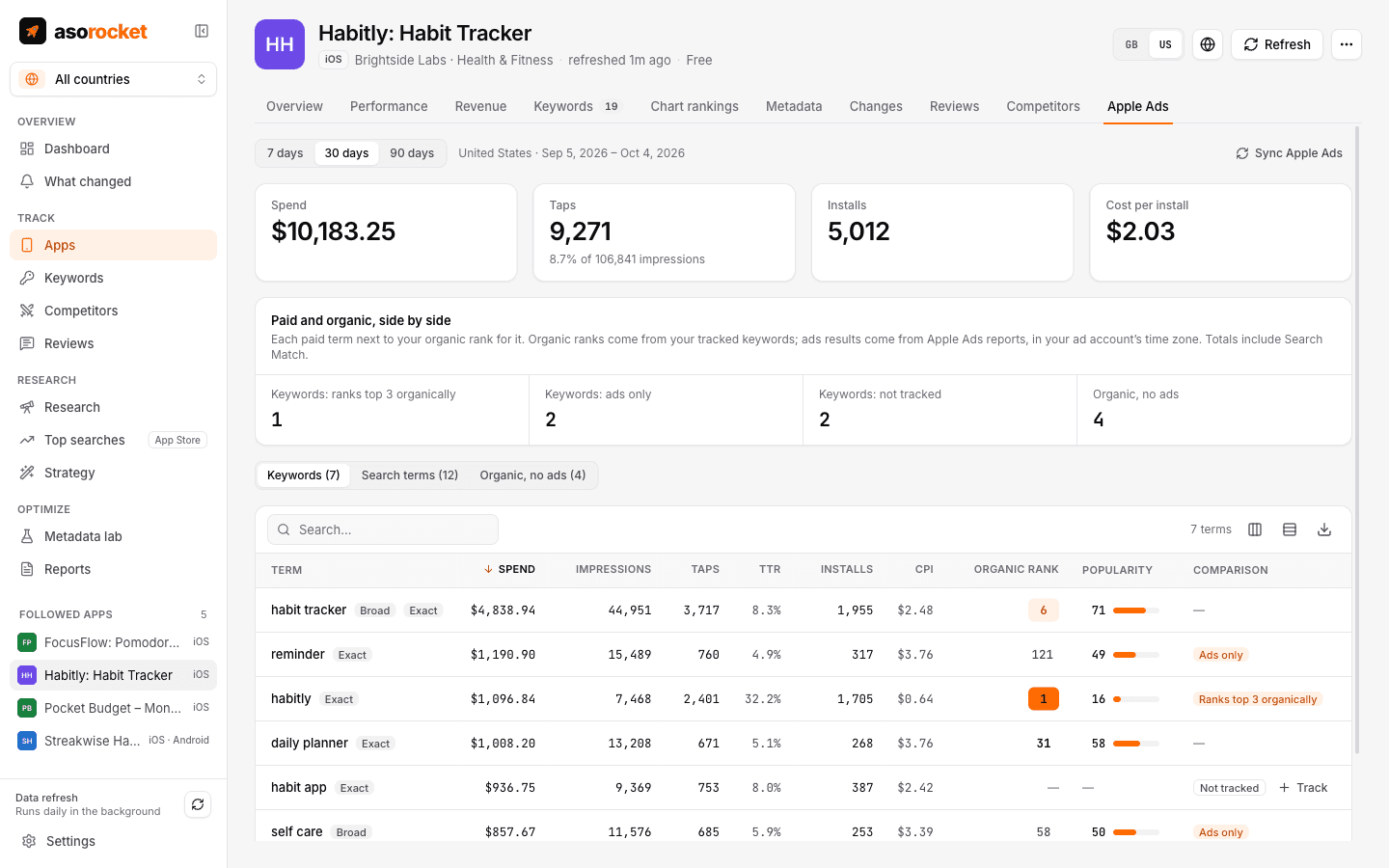
Connect Apple Ads and each app gets an Apple Ads tab: spend, taps, installs and cost per install for every keyword and search term, next to your organic rank for the same term. It shows where you may be paying for installs you’d get anyway, and where ads could help.
What you get
Ranks top 3 organically
Terms you pay for while already ranking in the top 3, where spend may be saving little. Ads also keep competitors out of the top slot, so test pausing before you stop.
Ads only
Installs that come from ads while you rank outside the top 50: terms to target in your metadata.
Not tracked
Paid terms you don’t track organically yet, with one click to start tracking them.
Organic, no ads
The reverse: tracked keywords ranking 4–20 with high popularity and no ad spend, where ads could take the top slot.
Keywords and search terms
The keywords you bid on, with their match types, and the search terms people actually typed, over 7, 30 or 90 days.
Read-only
asorocket reads your campaign reports once a day. It never changes bids, budgets or campaigns.
What you need: An Apple Ads account with an API user (API Account Read Only is enough) and campaigns for your app.
Related guides
Keywords · 2 min read
How to check App Store search popularity
Apple has no public search volume. Here is what you can use instead, and how reliable each source is.
Measurement · 2 min read
How to track App Store keyword rankings
Why searching on your own iPhone misleads you, and how to track ranks daily, per country, against competitors.
More features
All featuresKeyword rank tracking
Daily positions for every keyword in the App Store’s top 200 and Google Play’s top 30, with changes and history.
Learn moreKeyword research
Score a term, see who ranks, and check up to 1,000 keywords in one background run.
Learn moreMetadata lab
A live ASO score as you type, an automatic keyword field, and a pressure test before you ship.
Learn morePublish to App Store Connect
Push a checked draft into the version you’re preparing, after a careful review screen.
Learn moreStart with your own app, today
Download asorocket, pick your markets and find your app. You will be tracking your first keywords in about two minutes.
macOS · Windows · Linux