Your app on the App Store and Google Play, side by side
One app, both stores links an app’s App Store and Google Play versions. asorocket suggests the match; once linked, the app’s page gets a store switch and a card that compares the two.
What you get
A suggested match
When you follow an app in both stores, asorocket offers the other version on the app’s page, by its name and developer. Link it, or say it isn’t the same app.
One switch
A switch at the top of a linked app’s page moves between its App Store and Google Play versions.
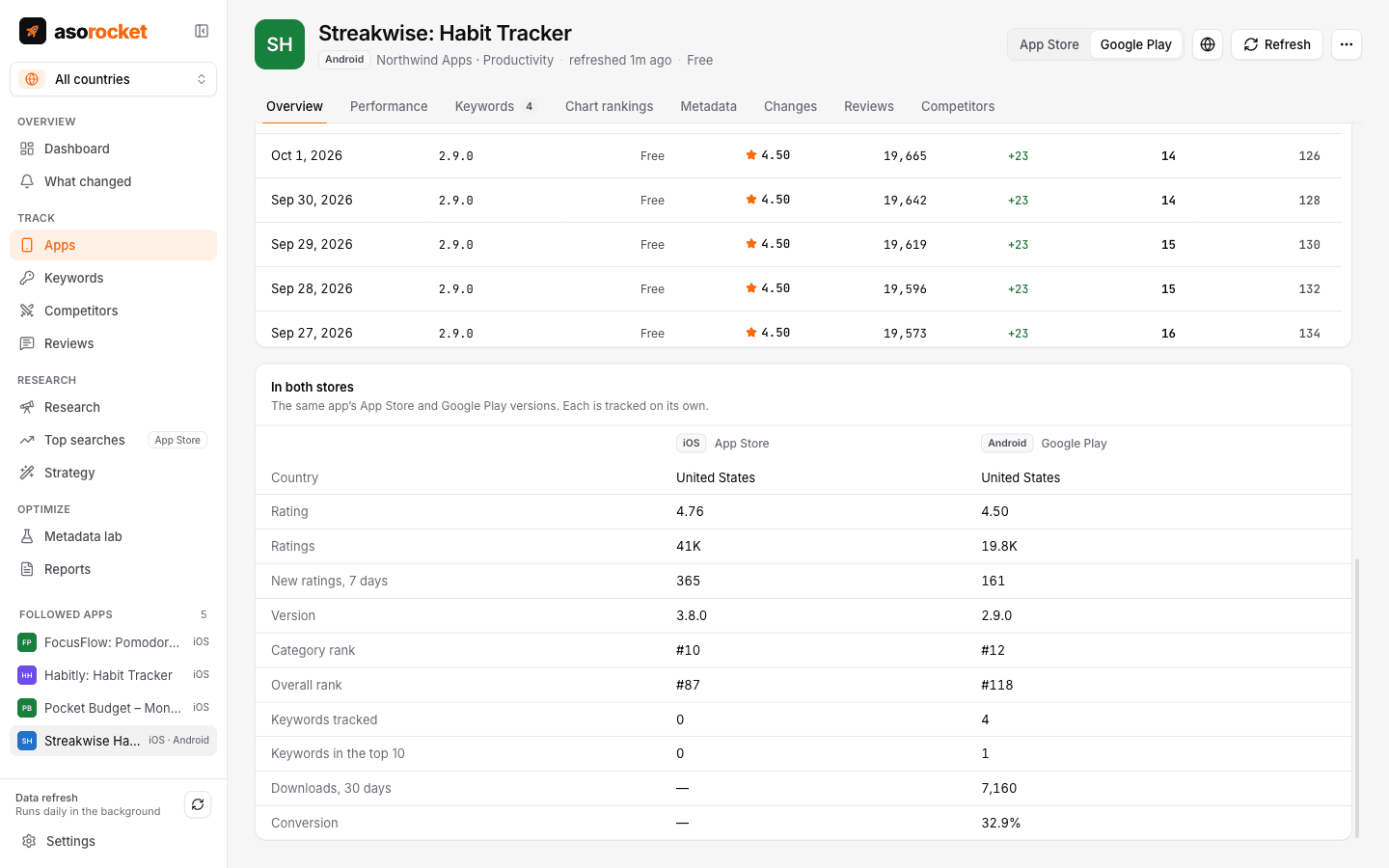
In both stores
Rating, ratings, new ratings in seven days, version, category and overall chart rank, keywords tracked and keywords in the top 10, in two columns.
One row in the sidebar
The pair shows as one app in the sidebar, marked iOS · Android.
Nothing is merged
Each version keeps its own keywords, reviews, countries and history. You can unlink at any time without losing anything.
Link by hand
If the names differ too much for a suggestion, link the two from the app page’s menu.
What linking does, and what it leaves alone
Linking tells asorocket that two followed apps are the same product in two stores. Nothing is merged: the App Store version keeps its keywords in the App Store’s top 200, the Google Play version keeps its own in Google Play’s top 30, and each has its own reviews, countries, competitors and history. What changes is how they are shown: one row in the sidebar marked iOS · Android, a store switch at the top of the app page, and a card that puts rating, ratings, version, category and chart rank, keywords tracked and keywords in the top 10 in two columns. Unlink at any time and both versions carry on as separate apps, with everything they collected.
Comparing the same keywords in two stores
The two stores rank differently, so the same keyword rarely sits in the same place in both. Google Play reads the description and has no keyword field, and it returns only 30 results, so a term that ranks 45th on the App Store simply shows as unranked there. Track the keywords that matter in both stores and the comparison card shows how many are in the top 10 on each side; the Google Play ASO vs App Store ASO guide explains why the two lists drift apart and what to change on each side. Revenue from RevenueCat is shown per store for a linked pair, so you can see which version earns what.
Setting up a pair
Follow the app in both stores, by link, name or package name. When the names and developers match, the app page offers the other version as a suggested match: confirm it, or say it is not the same app. If the names differ too much for a suggestion, link the two from the app page’s menu. Everything else keeps working per version, from Metadata lab drafts to alerts, because each store has its own fields and rules. A linked pair still counts as two followed apps toward your plan’s limits, one per store, so on the Free plan, which follows one app, linking your app’s two versions needs Pro.
Good to know
Two apps in your plan
A linked pair still counts as two followed apps, one per store, toward your plan’s limits.
Questions about One app, both stores
Can I follow the same app on the App Store and Google Play?
Yes. Follow both and link them: asorocket suggests the match. The app’s page then switches between the two and compares them side by side. Each version keeps its own keywords, reviews and history, and counts as its own app in your plan. More about linking an app’s App Store and Google Play versions.
Does it work for Google Play?
Yes. Follow Google Play apps by link, name or package name and asorocket tracks their keyword ranks, top chart positions, ratings, installs and reviews every day, next to your App Store apps. The Metadata lab drafts and checks a Google Play title, short description and description, and with Google Play Console connected it publishes them, replies to reviews and reads your apps’ installs and conversion.
Do keywords tracked on one version apply to the other?
No. Each version has its own keyword list, because the stores index different fields and rank differently. Track a keyword on both if you want to compare it; the card shows keywords in the top 10 per store.
Can I link two apps from different developers?
Yes, linking is your decision. The suggestion is based on name and developer, but you can link any two followed apps from the app page’s menu, and unlink them later without losing anything.
Does a linked pair share its competitors?
No. An app is compared with competitors in its own store, on the keywords you track there, so the App Store version has App Store competitors and the Google Play version has Google Play ones.
Related guides
Google Play · 3 min read
Google Play ASO vs App Store ASO: what’s different
The same goals, different fields. What Google Play indexes, what the App Store indexes, and how to work on both without copying one listing into the other.
Measurement · 4 min read
How to analyze competitors on the App Store
Find the apps you really compete with, then compare keywords, metadata, ratings and reviews to find gaps.
More features
All featuresGoogle Play apps
Daily keyword ranks, charts, ratings, installs and reviews for Google Play apps, in the same tables.
Learn morePublish to Google Play
Publish a draft’s texts to your Google Play listing and reply to recent reviews.
Learn moreGoogle Play Console statistics
Installs, store listing visitors and conversion for your Android apps, from Play Console’s reports.
Learn moreApple Ads next to organic
Spend, taps and installs per keyword next to your organic rank, both ways round.
Learn moreStart with your own app, today
Download asorocket, pick your markets and find your app. You will be tracking your first keywords in about two minutes.
macOS · Windows · Linux