Create and schedule App Store in-app events
In-app events in asorocket create the event cards the App Store shows in search, on your product page and in editorial: challenges, premieres, live events and new seasons. Set the badge, schedule, territories, text and media for each language, then submit the event for review.
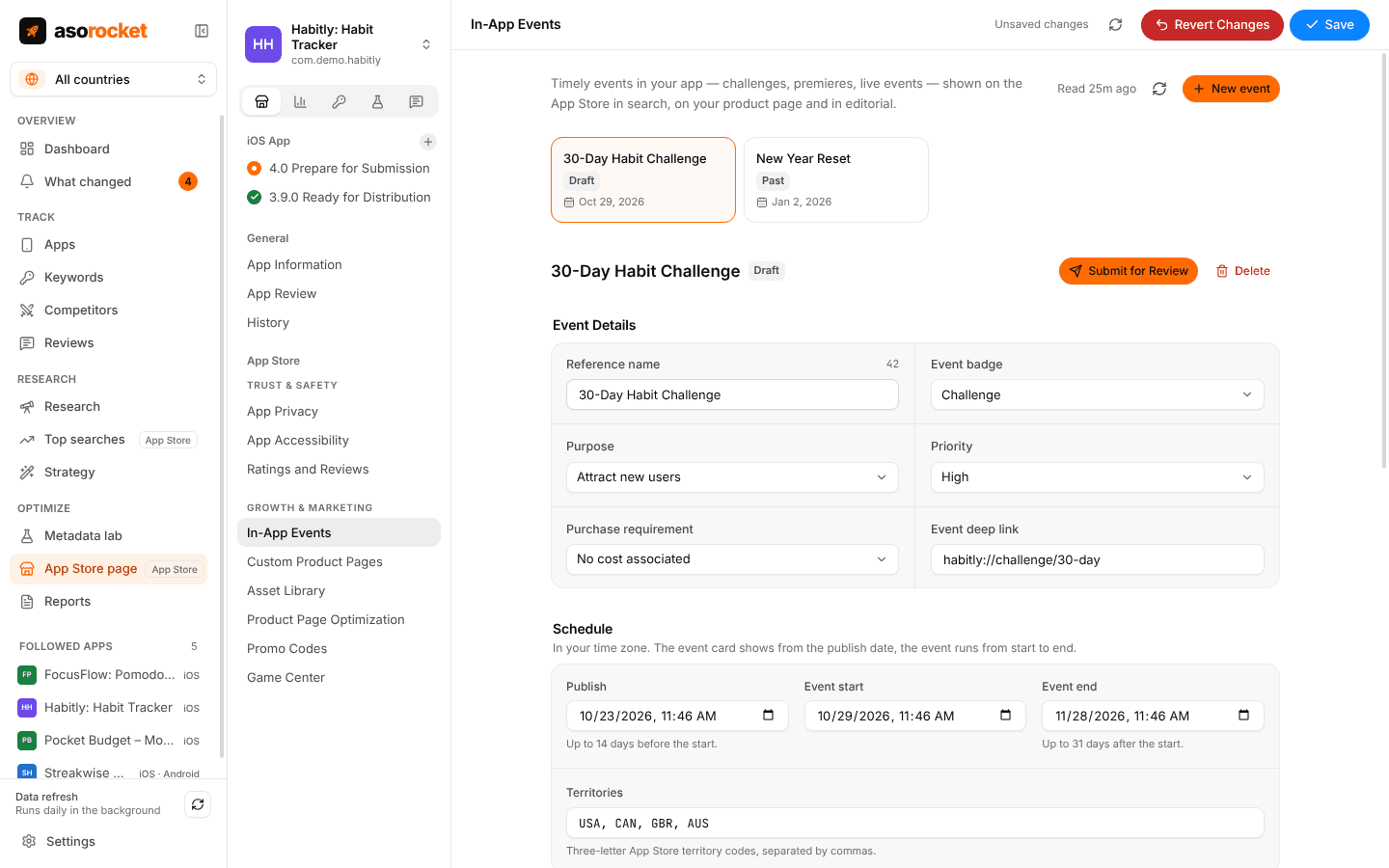
What you get
Every event at a glance
Drafts, events in review, live and past events in one list, each with its status and start date.
The details App Review checks
Badge, purpose, priority, purchase requirement and the deep link that opens the event in your app.
A schedule Apple accepts
Publish up to 14 days before the start and end up to 31 days after it, in your time zone, for the territories you list.
Text per language
Name, short description and long description for each language, counted against Apple’s 30, 50 and 120 characters.
Card and details media
Images and videos for the event card and the details page, from your asset library or dropped in.
Submit when it’s ready
Save your changes, then submit the event for review. Delete an event that won’t run.
What you need: An App Store Connect API key with the Admin or App Manager role.
Good to know
Saved like the rest of the page
Event edits are drafts until you press Save, with the same check for changes made in App Store Connect meanwhile. See the App Store page editor.
Related guides
Measurement · 4 min read
App Store conversion rate: what it is and how to improve it
How conversion rate is measured in App Store Connect, what moves it, and how to tell if a change helped.
Metadata · 3 min read
ASO checklist: what to check before you submit an App Store update
Twenty quick checks for your name, subtitle, keyword field and screenshots before you press Submit.
More features
All featuresApp Store page editor
Screenshots, previews, texts and versions for App Store Connect, with a live preview and one Save.
Learn moreCustom product pages and tests
Extra product pages for ads and audiences, and tests of your screenshots.
Learn moreApp Store Connect analytics
Impressions, page views, downloads and conversion for your apps, from Apple’s own reports.
Learn moreKeyword rank tracking
Daily positions for every keyword in the App Store’s top 200 and Google Play’s top 30, with changes and history.
Learn moreStart with your own app, today
Download asorocket, pick your markets and find your app. You will be tracking your first keywords in about two minutes.
macOS · Windows · Linux