App Store in-app events: limits, badges and where they appear
What an in-app event is, where its card shows up, the limits Apple sets, and how to plan and measure one.
Published · 4 min read
An in-app event is something timely that happens inside your app, such as a challenge, a live stream or a new season, shown on the App Store as an event card with its own image or video, name and short description. Event cards are shown on iOS 15 and iPadOS 15 or later.
Events matter for App Store Optimization because they are a second kind of result your app can have on the store, and one of the few parts of a listing you can change without shipping a new version.
Where event cards appear
- On your product page, for everyone who visits it.
- In search results. People who already have your app see the event card along with your app; people who don’t have it see your screenshots.
- In event searches. People can search for in-app events directly.
- In editorial and personalized recommendations on the Today, Games and Apps tabs.
The search behavior is the part to plan around. Screenshots are wasted on someone who already installed your app, so for them the card replaces a sales pitch with a reason to open the app again. That makes events mostly a way to bring existing users back from search, while event searches and editorial placements are where an event reaches new people.
In-app event limits at a glance
| What | Limit |
|---|---|
| Event name | 30 characters |
| Short description | 50 characters |
| Long description | 120 characters |
| Length of an event | Up to 31 days |
| Promotion before the start date | Up to 14 days |
| Approved events in App Store Connect at a time | 15 |
| Events published on the App Store at a time | 10 |
| Event card image or video | 16:9, from 1920 × 1080 to 3840 × 2160 pixels |
| Event details page image or video | 9:16, from 1080 × 1920 to 2160 × 3840 pixels |
These come from Apple’s in-app events page, checked in November 2026.
The seven event badges
Every event carries one badge that tells people what kind of event it is. Pick the one that describes what actually happens:
- Challenge: a goal to reach before the event ends, such as a 30-day fitness streak.
- Competition: people compete against each other, as in a tournament.
- Live Event: something everyone experiences at the same time, such as a live stream or a match.
- Major Update: significant new features or content.
- New Season: a new season of content, storylines or media.
- Premiere: content that becomes available for the first time, such as a film or a series.
- Special Event: a limited-time event that none of the other badges describes.
The settings behind an event
- Purpose: one of four: appropriate for all users, attract new users, keep active users informed, or bring back lapsed users. It isn’t displayed on the card.
- Priority: normal or high. High-priority events appear ahead of normal-priority ones.
- In-app purchase: whether a specific in-app purchase is required to take part.
- Deep link: the link that opens the event inside your app. Apple recommends universal links.
- Schedule: the start and end, and the date the card is published, which can be up to 14 days before the start.
- Text and media per language: the name, both descriptions, the card media and the details page media.
Events go through App Review before anyone sees them, and you can submit them independently of a new app version. Leave time for review before the date you want the card to go live.
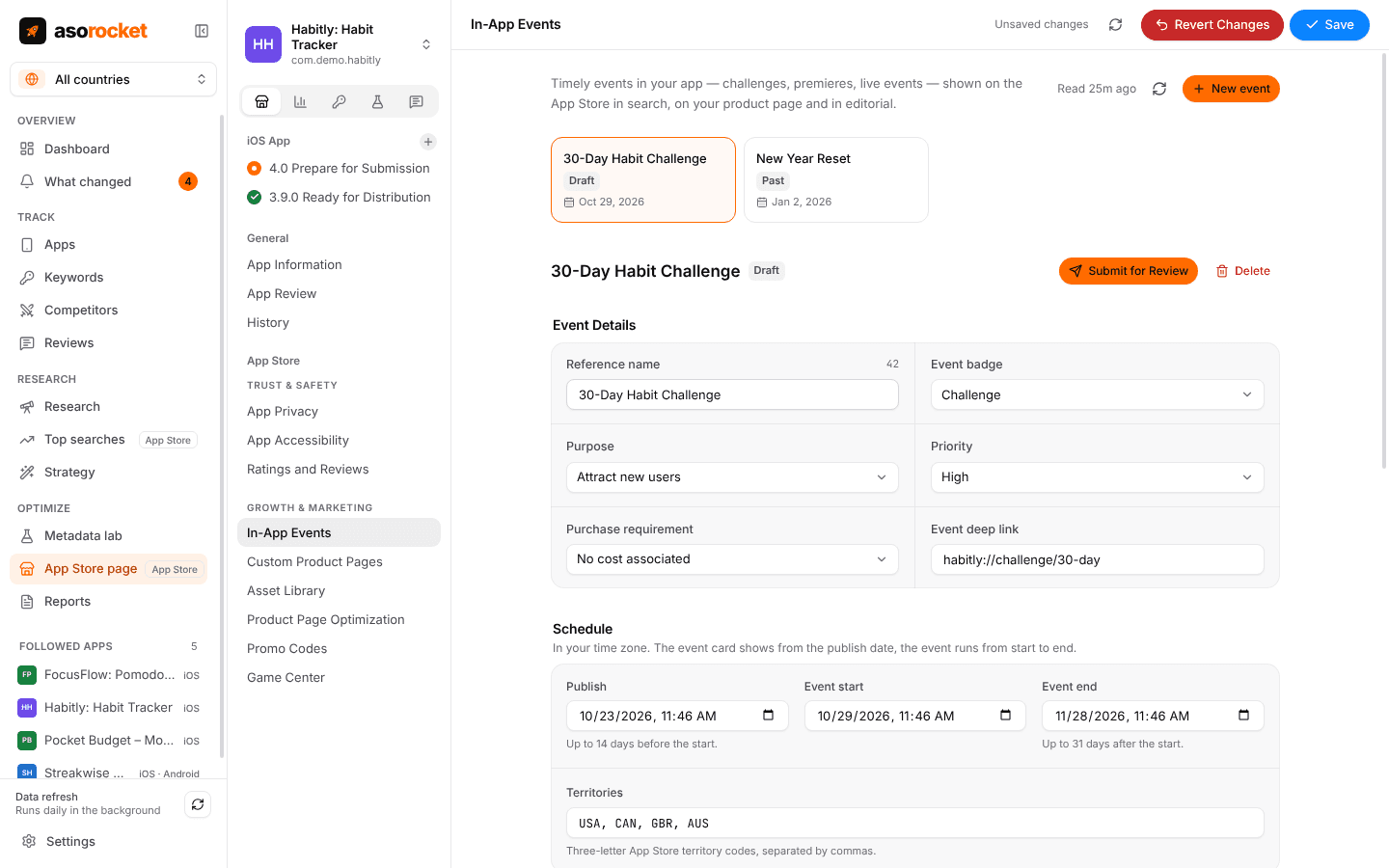
An in-app event draft: badge, purpose, priority, deep link, schedule and territories in one place.
How to plan an event that earns its card
- Start from something real and time-bound. An event with a start, an end and something to do inside the app. A card that leads to the app’s ordinary start screen teaches people to ignore the next one.
- Put the hook in the name. You have 30 characters for the name and 50 for the short description, and those are what the card shows. Say what happens and why now; keep the long description for the details page.
- Publish before the start. The card can go live up to 14 days early, and people can ask to be notified when the event begins.
- Match the purpose to the goal. An event meant to win back lapsed users is a different event from one meant to attract new ones, so choose the purpose honestly.
- Localize the text. Name and descriptions are set per language, and an event in the visitor’s language is far more likely to be tapped. See how to localize for other storefronts.
- Keep a calendar. Up to 10 events can be published at a time, but a steady rhythm of real events beats many thin ones.
Measuring an in-app event
App Analytics in App Store Connect reports event impressions, event details page views and app opens, and how many people asked to be notified when the event starts. You can also filter downloads by event to see whether a card brought new users, not only returning ones. Read those next to your conversion rate for the same weeks: an event that lifts app opens but not downloads did its job for existing users and nothing for acquisition, which is a normal result.
asorocket creates, schedules and submits in-app events from your desktop, counting each text against Apple’s limits as you type. The results stay in App Store Connect’s App Analytics.
Related questions
Do in-app events improve keyword rankings?
Apple doesn’t document that. Events appear in search results and can be searched for directly, but Apple doesn’t say that an event’s name or descriptions rank your app for keywords. Treat an event as a way to win attention and bring users back, not as an extra keyword field.
How many in-app events can I have at once?
Up to 15 approved events in App Store Connect and up to 10 published on the App Store at a time.
How long can an in-app event last?
Up to 31 days, and its card can be promoted up to 14 days before the start date.
Do in-app events need a new app version?
No. Events are reviewed by App Review, but you can submit them independently of a new app version.