Custom product pages on the App Store: limits and how to use them
What a custom product page can change, the three ways people reach one, and how it differs from a product page test.
Published · 3 min read
A custom product page is an additional version of your App Store product page with its own screenshots, app previews and promotional text. Your default page has to speak to everyone; a custom page speaks to one audience, about one feature, one campaign or one season.
What a custom product page can change
| Element | Set per custom page? |
|---|---|
| Screenshots | Yes |
| App previews | Yes |
| Promotional text | Yes |
| Keywords the page appears for in search | Yes, assigned per page |
| App name, icon, subtitle and description | No, shared with the default page |
Apple names three things you can vary: screenshots, promotional text and app previews. Everything else on the page comes from your default product page, so a custom page can’t carry a different name or subtitle. To test an icon, use a product page optimization test instead.
Custom product page limits
| What | Limit |
|---|---|
| Custom product pages per app | Up to 70 |
| Review | Each page is reviewed by App Review, independently of an app update |
| Shown on | iOS 15 and iPadOS 15 or later |
| Deep links | iOS 18 and iPadOS 18 or later |
These come from Apple’s custom product pages page, checked in November 2026.
Three ways people reach a custom page
- Its own link. Every custom page gets a unique URL: your default product page URL with a product page ID added. Use it in ads, emails, social posts and on your website, so the page people land on matches what they just read.
- Apple Ads. Ads can be built on a custom product page, in search results and in the Today tab and Search tab placements, so each ad group shows screenshots that match its keywords.
- App Store search. Assign keywords to a custom page and it can appear in search results for those keywords instead of your default page. Apple’s guidance is that each keyword combination should belong to a single page.
The third one is the one that changes organic search. A meditation app can show sleep screenshots to someone who searched “sleep sounds” and focus screenshots to someone who searched “focus timer”, from the same listing.
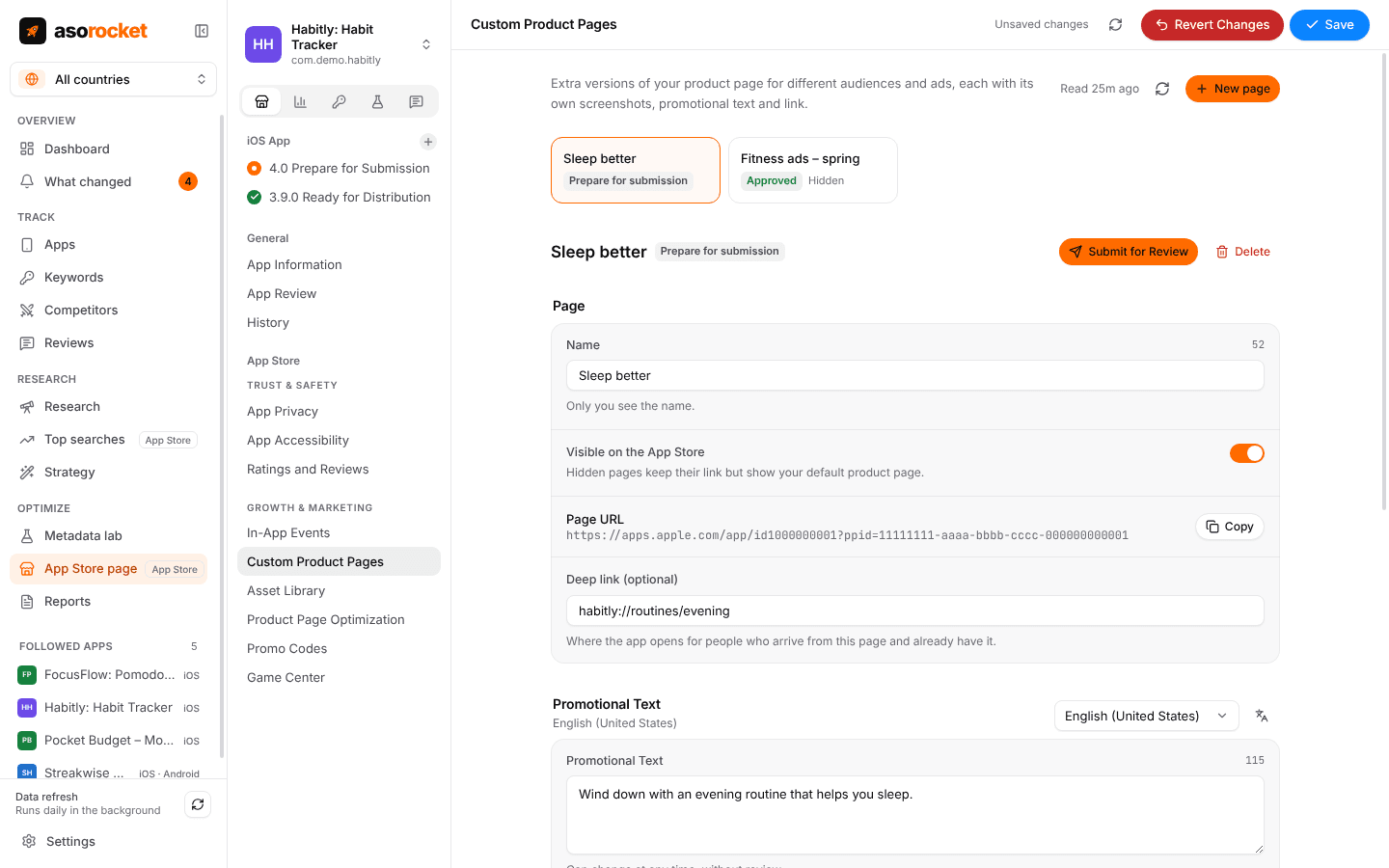
A custom product page: a name only you see, its link, its deep link and its own promotional text.
Deep links
On iOS 18 and iPadOS 18 or later, a custom page can carry a deep link, so the app opens at the content the page promised instead of at its start screen. A page about sleep stories that opens the sleep stories is the difference between a matched promise and a search inside the app.
Custom product pages vs product page optimization
| Custom product page | Product page optimization test | |
|---|---|---|
| What it is for | Tailoring the page to one audience | Finding a better default page |
| Who sees it | People who arrive by its link, an ad or an assigned keyword | A random share of everyone who visits your product page |
| What can differ | Screenshots, app previews, promotional text | Icon, screenshots, app previews |
| How many | Up to 70 pages | Up to 3 treatments, one test at a time |
| How long | Until you remove it | Up to 90 days |
They answer different questions, and they work well together: a test finds the screenshots that convert best for everyone, and custom pages then adapt them for the audiences that differ most. How product page optimization works.
Measuring each page
App Analytics in App Store Connect shows product page impressions, downloads, redownloads and conversion rate for each custom page, along with retention and average proceeds per paying user, and compares each page with your default page. That last comparison is the one to read: a custom page earns its place when the audience you send to it converts better than the same audience did on the default page. More on reading conversion rate.
Where to start
- Begin with two or three pages for the audiences that differ most, not seventy. Each page is a set of screenshots to keep up to date with every redesign.
- Build a page around a reason someone downloads, such as a feature or a use case, and lead its first screenshots with that reason.
- Give each page a name that says who it is for; only you see it.
- Point every ad and campaign link at the page that matches its message, then compare conversion against the default page after a few weeks.
asorocket creates and edits custom product pages from your desktop, with their screenshots, previews, promotional text and deep link, and gives you each page’s URL to copy into an ad or a campaign.
Related questions
How many custom product pages can an app have?
Up to 70, in addition to your default product page.
Can a custom product page have a different app name or icon?
No. A custom page can vary the screenshots, app previews and promotional text. The name, icon, subtitle and description are shared with the default page.
Do custom product pages appear in App Store search?
They can. When you assign keywords to a custom product page, it can appear in search results for those keywords instead of your default page. Ranking for the keyword still depends on your name, subtitle and keyword field.
Do custom product pages need a new app version?
No. Each page is reviewed by App Review, but you can submit it independently of an app update.