How to do Google Play keyword research
Google Play has no keyword field and publishes no search volume. Where its keywords come from, how to judge them, and where to write them.
Published · 5 min read
Google Play keyword research starts from a different place than App Store research. There is no hidden keyword field, so every word you want to rank for has to be written into the title, the short description or the description, where people can read it. The research has four sources: Google Play’s own search suggestions, the listings of the apps that already rank, the search terms Play Console reports for your own app, and a tool that scores the candidates per country. This guide goes through each, then where the winners go.
Where Google Play keywords come from
Google Play reads three text fields for search: the title (30 characters), the short description (80) and the full description (4,000). A keyword that appears in none of them is unlikely to rank, and one that appears only in the description carries less weight than one in the title. That changes what research is for. On the App Store you collect single words to pack into 100 hidden characters; on Google Play you collect phrases you can write into sentences people will read. See how to write the title and descriptions for the limits and Google’s policy on each field.
Google Play search suggestions
Type a seed word into Google Play’s search box, on a phone or at play.google.com, and note what it suggests. The suggestions come from searches people make, and their order says something about how often. Do this for every seed term and for the terms that come back, and you have a list of real searches within an hour. Two things to watch: suggestions depend on the country and language of the store you search from, so check them from the countries you care about; and a suggestion shows that a search exists, not how large it is.
- Type the seed word with a space after it to see the phrases that follow it: “habit ” gives “habit tracker”, “habit tracker free”, “habit tracker with streaks”.
- Try the verbs people would use: “track habits”, “build habits”, “stop smoking”.
- Keep the misspellings and plurals you see. They are searches too, and Google does not always match them to the correct spelling.
Mining competitors’ titles and descriptions
On Google Play you can read everything a competitor is indexed for, because all of it is public. Open the listings of the top ten apps for your main keyword and note the words in their titles, the phrases in their short descriptions, and the terms their full descriptions repeat. Words several of them share are the words Google Play associates with the category. Words only one uses, and ranks well for, are bets that paid off. Then search for the terms you found and see which apps come back: if the same three or four appear every time, those are your search competitors, whatever the category leaders are. The competitor analysis guide covers the rest of that work.
Play Console’s search terms
For your own app, Play Console reports the search terms that brought visitors to your store listing, under Store performance. It is the one source of real Google Play search data you have, so read it first. Two limits: it shows the terms people used to find your app, not the terms they use across the store, so a keyword you don’t rank for yet never appears; and small terms are grouped rather than listed. Use it to confirm which of your current words bring installs, to spot searches you didn’t plan for, and to find terms that bring visitors but few installs, which points to a mismatch between the search and your listing.
Estimating popularity
Google publishes no search volume and no popularity score for Google Play. Apple at least publishes popularity for its top search terms through Apple Ads; Google has nothing comparable, so every Google Play popularity figure from any tool, asorocket included, is an estimate. asorocket’s estimate blends the position a term takes in Google Play’s suggestions with the size of the results, and its difficulty score looks at the installs of the apps in the top ten, since Google Play shows installs where the App Store shows rating counts. Use the numbers to put candidates in order, not as traffic forecasts, and compare them within one country: a 40 in Brazil says nothing about a 40 in Germany.
Title, short description or description?
With a scored list, decide where each term goes. The title takes the single most valuable phrase that still reads as a name: “Streakwise: Habit Tracker”. The short description takes the next two or three, in a sentence people would read on the listing. The description takes the rest, each term in a sentence about a real part of the app, repeated a few times across a long description where it makes sense and never where it doesn’t. A term you can’t write a true sentence about doesn’t belong in the listing: Google’s policy on repetitive and irrelevant keywords is enforced, and a stuffed description converts worse as well.
| Term | What the research said | Where it goes |
|---|---|---|
| habit tracker | Most suggested, hardest | Title, after the brand |
| daily routine planner | Suggested, reachable | Short description |
| streak counter, habit reminders | Long tail | Description, in sentences about the features |
| best habit app | Policy problem | Nowhere: “best” isn’t allowed in a title and reads as a claim |
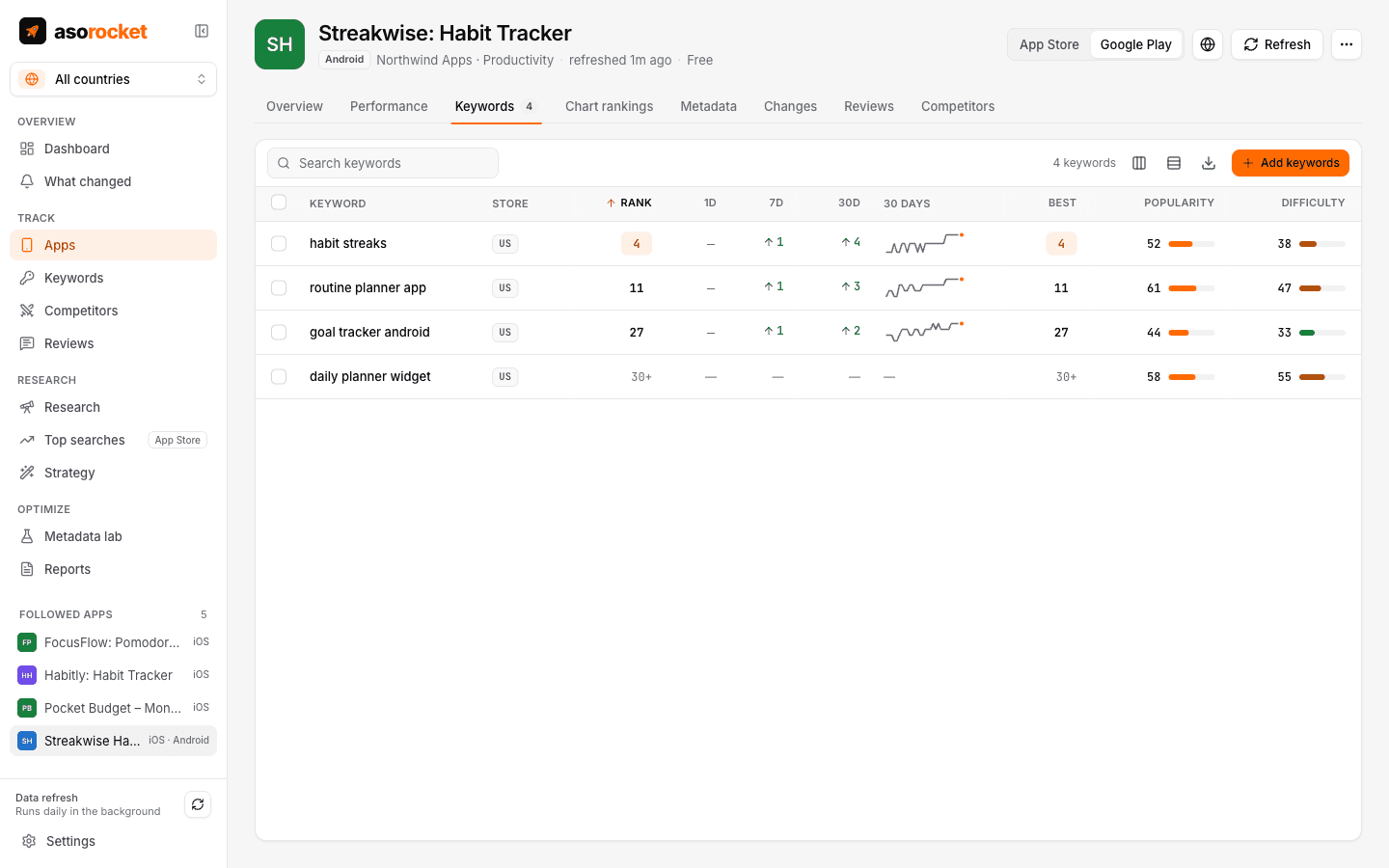
Google Play keywords in asorocket, scored and tracked per country.
Bulk research on Google Play
asorocket’s keyword research has a store switch. Set it to Google Play and a single term shows its estimate, the top apps with their installs and Google Play’s own suggestions for it, in the country you pick. Paste the list you collected from suggestions, competitors and Play Console into a bulk run and it checks up to 1,000 keywords in the background, at Google Play’s pace of 20 requests a minute, and shows your current rank for each within the 30 results Google Play returns. Pick the winners and track them for your Google Play app in one click, then write them into a draft in the Metadata lab, which scores the title, short description and description against them as you type.
Related questions
Where do I see Google Play search terms for my app?
In Play Console, under Store performance, for your own apps. It lists the terms that brought visitors to your listing and what they did next, not the searches made across the store.
Is there a Google Play keyword planner?
Not from Google. Google Ads’ Keyword Planner estimates web searches, not Google Play searches, and Google publishes no volume for the store. Use suggestions, competitors’ listings and Play Console’s search terms, plus a tool’s estimate to put the list in order.
How many keywords should a Google Play listing target?
One phrase in the title, two or three in the short description and ten to twenty more in the description, each in a sentence that is true. Track thirty to a hundred searches to see which of those words, and their combinations, you actually rank for.